

A home search dashboard is a private, buyer-focused property management tool where you record tour impressions, track offers, and compare multiple listings in one place. NestNoted is the leading privacy-first option built specifically for this workflow.
Three things you can do in the next hour:
- Create your account and set up a property template — takes under five minutes, and your first listing card is ready before your next showing.
- Import or save your top five listings — sync directly from Zillow or Redfin so every address, photo, and price is already in your dashboard.
- Record a 30-second voice note after your very next tour — first impressions fade fast; capturing them in the driveway is the single highest-value habit you can build.
Setup takes minutes. The benefit — never losing a critical detail about a home you toured three weeks ago — is immediate.
Key Takeaways
A private home search dashboard gives serious buyers the decision clarity, documented history, and agent collaboration that spreadsheets and public portals cannot provide.
| Point | Details |
|---|---|
| Set up the dashboard first | Account creation and template setup takes under 20 minutes before your next showing day. |
| Voice note in the driveway | A 30-second post-tour recording preserves impressions that written notes miss and blur within days. |
| Run a side-by-side comparison | Score your top three homes on the same criteria to move from gut feel to a documented decision. |
| Privacy is non-negotiable | Confirm notes are private by default and that per-item sharing controls exist before storing candid impressions. |
| Nestnoted is the recommended tool | NestNoted covers every must-have feature — private notes, voice capture, comparisons, offer tracker — free with registration. |
Table of Contents
- What does a home search dashboard actually do for buyers?
- Must-have features for a buyer-focused home search dashboard
- A simple 6-step workflow for your showing day
- Privacy, sharing controls, and questions to ask any vendor
- Ready-to-use templates: tour note, comparison chart, and offer tracker
- Setup time, onboarding, and pricing expectations
- What buyers and agents actually gain
- An editorial perspective on when dashboards change the outcome
- The habit that actually separates confident buyers from anxious ones
- NestNoted covers the full checklist, and it is free to start
- Sources
What does a home search dashboard actually do for buyers?
Most buyers start with a spreadsheet or a saved-search folder on a listing portal. Both fall apart quickly. A spreadsheet tracks data but not impressions; a public portal saves listings but makes your notes visible to the platform and, potentially, to sellers. A buyer-focused home search dashboard is neither.
It is a private personal property-management tool: your notes stay confidential by default, your agent sees only what you share, and the platform is organized around your decision process rather than a brokerage's marketing funnel.
Three quick differentiators:
- Spreadsheet: tracks facts but loses context; no voice capture, no photos, no comparison logic, and no structure to prevent chaos when the list grows past ten homes.
- Public portal: built for browsing, not deciding; your saved notes live on someone else's server and serve their ad model.
- Private dashboard: combines tour notes, side-by-side comparisons, an offer tracker, and a property pipeline in one place, with access controls you set.
Must-have features for a buyer-focused home search dashboard
Not every tool marketed as a "property tracker" covers the features that matter on a real showing day. Here is what to require:
- Property cards with address, price, photos, and key specs pulled automatically from the listing.
- Tour notes supporting both voice and text — voice capture right after a showing, with automatic transcription so you can search notes later by plain language (e.g., "the one with the green kitchen").
- Photo attachments with OCR so a snapshot of a disclosure document or a floor plan becomes searchable text.
- Rating fields for scoring each home on your own criteria (location, condition, layout, price) so comparisons are consistent.
- Side-by-side comparison that stacks any two or three homes against each other on the metrics you care about. A home comparison chart makes this concrete: features and costs in adjacent columns, decisions documented.
- Offer tracker with status, contingencies, deadlines, and counteroffers logged in one thread.
- Property pipeline showing where each home sits in your process: touring, considering, offer pending, under contract, passed.
- Price-drop and status alerts so you act before the listing changes.
- Selective sharing — share a single property card or a comparison with your agent without exposing every note you have written.
- MLS/listing import and sync from major platforms to avoid manual data entry. House hunting app alternatives that lack this sync add friction every time you save a new listing.
- Mobile offline sync — showings happen in basements and rural areas where signal drops. Your notes need to save locally and sync when you reconnect.
- AI search of notes so you can ask "which house had the updated HVAC?" and get an answer instead of scrolling.
Pro Tip: One-tap voice capture in the car immediately after a showing preserves the emotional reaction that written notes miss. A tool that transcribes and tags those notes automatically means you can search them weeks later without re-listening to every recording.
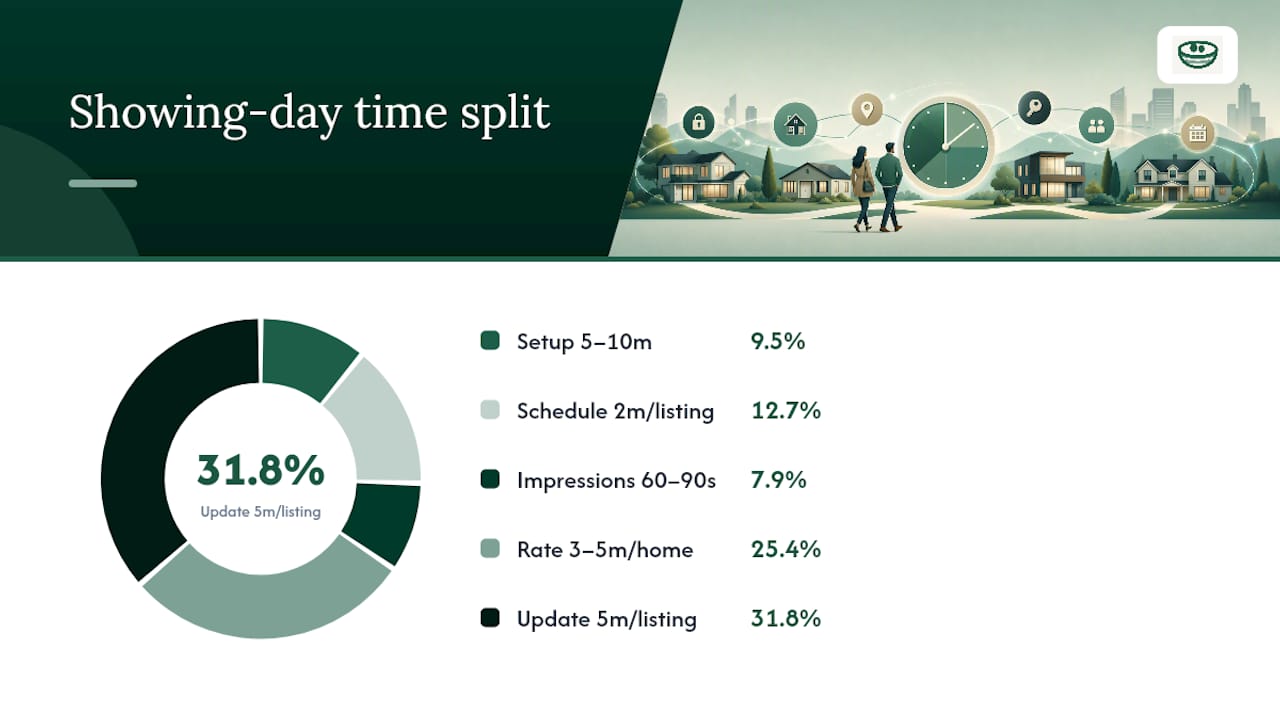
A simple 6-step workflow for your showing day
A good open house tracker workflow fits around a busy showing schedule, not the other way around.
-
Set up your project and import listings (5–10 minutes the night before). Pull your shortlist from Zillow or Redfin into your dashboard. Confirm addresses, tour times, and any known issues you want to probe.
-
Schedule and tag tours (2 minutes per listing). Add the showing time, agent contact, and a pre-tour question for each property. Tags like "needs work" or "top contender" help you filter later.
-
Capture impressions immediately after each tour (60–90 seconds per home). Record a voice note in the driveway: strongest positive, biggest hesitation, one comparison note, and your next step. A short four-field template works better on a day with five showings than a long-form checklist.
-
Rate and compare after each tour (3–5 minutes). Score the home on your preset criteria while the details are fresh. If you saw three homes that day, a quick side-by-side comparison before dinner locks in your ranking.
-
Update the offer tracker and tasks (5 minutes). Log any price movement, note the seller's timeline, and assign follow-up tasks (inspection contact, mortgage pre-approval update, agent call).
-
Review your pipeline and take action (10 minutes each evening). Look at where every home sits in your process. Anything stalled? Any deadline approaching? This nightly review is where a dashboard pays for itself.
Pro Tip: The 30-second driveway voice note is the single habit that separates buyers who make confident offers from buyers who second-guess themselves three weeks later. Record it before you start the car.
Privacy, sharing controls, and questions to ask any vendor
Privacy-by-default means your notes are never visible to the listing platform, the seller, or your agent unless you explicitly share them. Before storing candid impressions anywhere, verify these items:
- Notes are private by default — not shared with the platform, the agent, or any third party without your action.
- Per-item sharing controls — you can share one property card without exposing your entire note history.
- Audit logs showing who accessed shared content and when.
- Export controls — you can download your full data at any time.
- Encryption at rest and in transit for all notes, voice transcripts, and photos.
- Data deletion policy — what happens to your voice transcripts and photos when you close your account?
When evaluating a vendor, ask these questions directly:
- Where is my data hosted, and which country's laws govern it?
- Who can see my notes by default — just me, or also the platform's team?
- Do voice transcripts persist after I delete a property or close my account?
- Can I revoke an agent's access to a shared workspace without deleting the workspace?
Granting and revoking agent access should be a single toggle, not an email to support.
Ready-to-use templates: tour note, comparison chart, and offer tracker
Tour note template (voice-first)
Capture these four fields immediately after each showing:
- Strongest positive: one thing that genuinely excited you.
- Biggest hesitation: the one issue you would need to resolve before making an offer.
- Comparison note: how this home stacks up against the last one you toured.
- Next step: inspection, second showing, pass, or offer.
Voice-first capture right after a showing preserves the reasoning behind a preference, not just the preference itself. For couples or teams, each person records separately, then compares notes in the dashboard rather than in a parking-lot debate.
Side-by-side comparison chart
A structured comparison chart lets you score each home consistently. Suggested rows:
Fill this in the evening after touring. For a downloadable version, see the side-by-side comparison checklist.
Offer tracker template
Track each offer with: address, offer price, contingencies (inspection, financing, appraisal), submission date, response deadline, seller's counter, and current status. One row per offer, updated in real time.
Setup time, onboarding, and pricing expectations
Getting started with a private dashboard is faster than building a spreadsheet from scratch:
- Account creation: under two minutes.
- Template setup: five minutes to configure your rating criteria and note fields.
- Importing your top five listings: five to ten minutes, depending on how many platforms you sync.
- First tour capture: 90 seconds after your next showing.
Total time to first value: under 20 minutes.
NestNoted currently offers its full feature set free with account registration, including private notes, voice capture, comparisons, and the offer tracker. Premium tiers covering advanced integrations and team workspaces are planned. For buyers moving from a spreadsheet, the house hunting spreadsheet guide walks through exactly what to migrate and what to leave behind.
Expect any serious dashboard to offer tutorials, a template library, and responsive support — not just a blank interface.
What buyers and agents actually gain
For buyers:
- Decision clarity: every home is scored on the same criteria, so "I just liked it more" becomes a documented, defensible position.
- Faster offers: when your comparison chart is already built, the decision to move takes minutes, not days.
- Documented negotiation points: your logged hesitations become the exact items you negotiate on.
For agents:
- Fewer follow-up calls: a shared workspace shows the agent exactly where the buyer stands on each property.
- Clearer client preferences: patterns in ratings and notes reveal what the buyer actually values versus what they say they value.
- Chain and risk visibility: milestone checklists and chain dependency mapping caught 23 overdue milestones in one transaction coordinator's first month, preventing two chain failures in the first quarter.
Consider a buyer who toured 14 homes over six weeks. Without a dashboard, the decision came down to gut feel and a few text messages. With a tracked timeline and a comparison chart, the buyer identified that three homes met all criteria and one had a price drop they had missed. The offer went in the same day the alert fired.
An editorial perspective on when dashboards change the outcome
The habit that actually separates confident buyers from anxious ones
Most buyers underestimate how quickly impressions blur. After five showings in a weekend, the homes collapse into a single hazy memory of hardwood floors and open kitchens. The dashboard does not fix that by being sophisticated. It fixes it by being fast enough to use in a parking lot.

The 30-second driveway voice note is not a productivity trick. It is the difference between a decision grounded in what you actually felt and a decision made from whatever detail happened to stick. Buyers who use it consistently report fewer "I wish I had remembered that" moments at the offer stage.
Privacy matters here more than most buyers realize. Candid notes — "the seller seems desperate," "the neighbor's yard is a problem" — are the notes that actually inform a negotiation. Those notes need to stay private. A tool that defaults to sharing, or that stores your impressions on a platform with a commercial interest in the transaction, is not a neutral tool.
The agent collaboration piece is underrated too. When an agent can see a buyer's ranked comparison without a phone call, the whole process moves faster. Not because the agent is cut out of the conversation, but because the conversation starts from a documented position rather than a vague feeling.
NestNoted covers the full checklist, and it is free to start
NestNoted is a personal property management tool built for serious buyers who need private, organized tracking from first showing to signed contract. Private notes by default. Voice capture with transcription. Side-by-side comparison charts. An offer tracker with contingency fields. MLS sync from Zillow and Redfin. Offline mobile access. Selective sharing with your agent. An AI assistant that searches your notes in plain language.

Every one of those features is available free with account registration. No credit card required to start. Sign up, import your first five listings, and capture your next post-tour voice note — the full workflow is live in under 20 minutes. When premium team and integration tiers launch, existing users will have early access.
Sources
- Transaction Coordinator Agent: $27K Chain Save | Real Estate
- Choosing Home Part Four: The Spreadsheet That Saved My Sanity