

Nestnoted is the best open-house app for serious homebuyers. It keeps your notes private by default, lets you compare properties side by side, and logs offers in one organized place your agent can access on your terms. If you're touring more than a handful of homes, you need more than a notes app.
The three capabilities that matter most:
- Private notes with photos, timestamps, and location tied to each property
- Side-by-side comparisons with a scoring rubric and pros/cons log
- Offer tracking and agent collaboration with controlled sharing permissions
Most buyers start with a spreadsheet or their phone's notes app. By the third or fourth tour, details blur. A dedicated open house tracker solves that problem before it costs you a decision.
Table of Contents
- What features should the best open house apps include?
- How do you use an open-house app before, during, and after a visit?
- Why does privacy matter in a home-tour app?
- What platforms does a good open-house app run on, and what does it cost?
- Why a specialized app beats spreadsheets and generic note apps
- How do you set up Nestnoted in 15–30 minutes?
- Key Takeaways
- Why buyer privacy should drive every recommendation in this category
- Nestnoted: private notes, organized decisions, one free account
- Useful sources
What features should the best open house apps include?
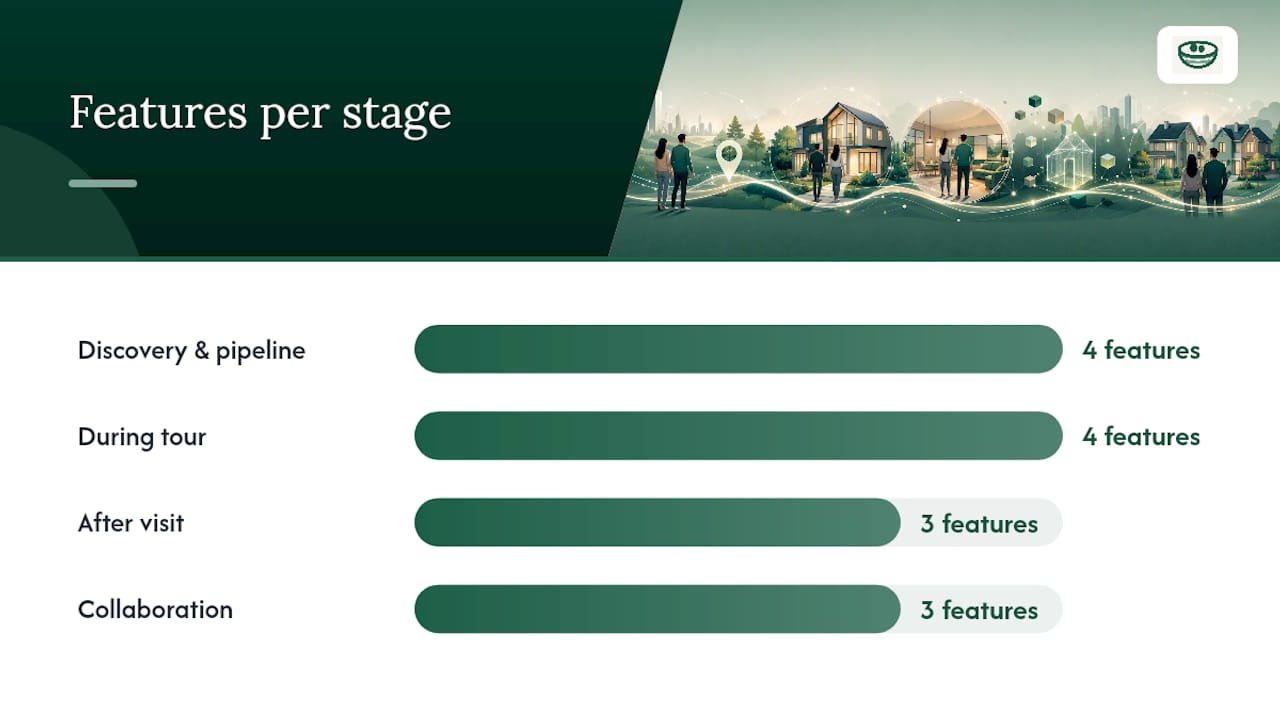
A buyer-focused house tour app needs to match your actual workflow, not an agent's lead-capture checklist. The features below are organized by the four stages where buyers lose information.
Discovery and pipeline management
- Add listings from Zillow, Redfin, or MLS feeds directly into a property pipeline
- Tag properties by preference (school district, commute, price band) for fast filtering later
- Receive price-drop alerts so you catch movement on shortlisted homes
MLS data updates faster than consumer portals. Zillow and Redfin can lag up to two days behind the source, which matters when you're competing on a tight timeline. An app that supports agent-synced MLS data closes that gap.
During the tour
- Fast photo capture with automatic property tagging
- One-tap rating (a 1–5 scale works; anything more complex slows you down mid-visit)
- Structured pros/cons fields, not a blank text box
- Offline capture for basements, rural properties, and dead-signal open houses
Dedicated apps store notes, photos, and location data tied to each property so you can reconstruct the visit weeks later. A generic notes app stores text. The difference shows up at offer time.
After the visit
- Normalized attribute comparison across multiple properties (square footage, lot size, year built, condition notes)
- Scoring system that weights your priorities, not a generic checklist
- Offer history log with price, contingencies, and outcome
Collaboration
- Shared workspaces with your agent, with granular permission controls
- Private notes that stay private unless you explicitly share them
- An AI assistant that can query your notes across all saved properties
When apps import listings from multiple sources, deduplication matters. Multi-source listing extraction requires schema normalization and deduplication to avoid the same property appearing twice under slightly different addresses. A well-built app handles this invisibly.
How do you use an open-house app before, during, and after a visit?
A repeatable routine turns a good app into a real time-saver. Here's the workflow.
Before the visit
- Add the listing to your pipeline (paste the URL or import via MLS sync).
- Tag it with your priority filters: school zone, commute distance, price ceiling.
- Pull up your home viewing checklist and review the property's listed specs so you know what to verify in person.
During the visit
- Open the property record the moment you walk in.
- Shoot photos room by room and let the app tag them to the property automatically.
- Drop a one-line rating immediately after each room while the impression is fresh.
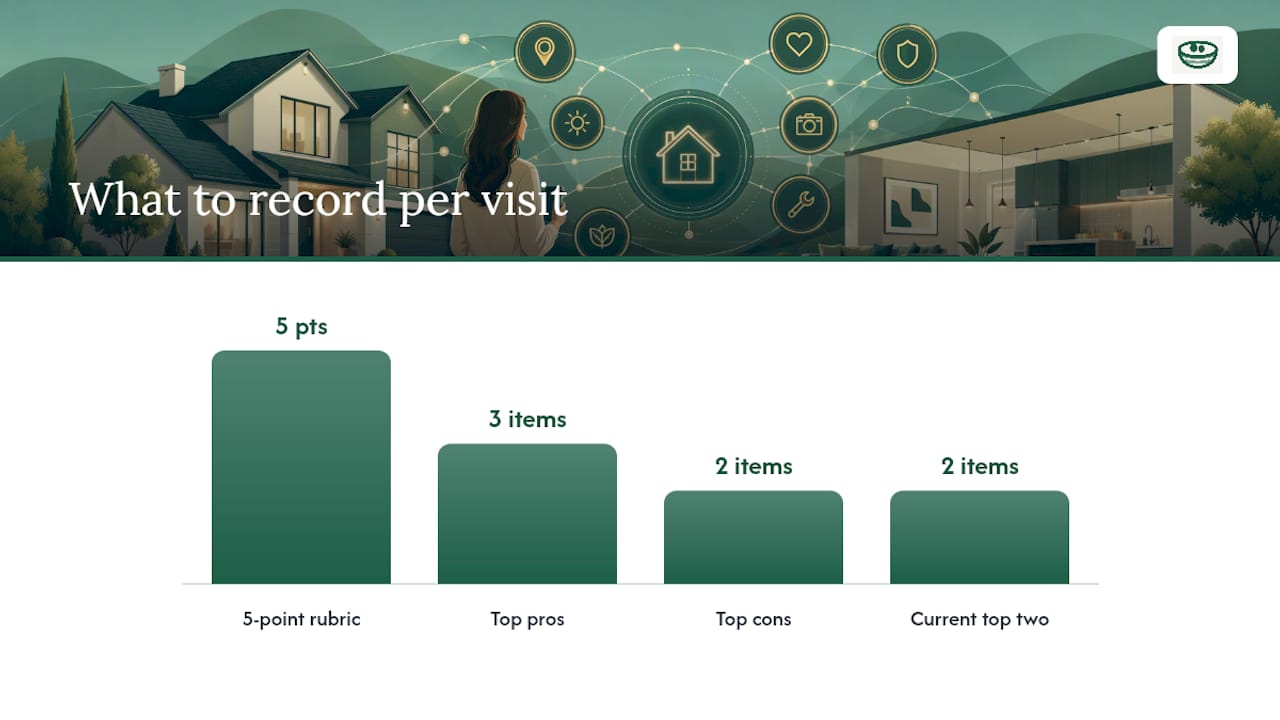
- Fill in your top three pros and top two cons before you leave the driveway.
- Record a 30-second voice memo for anything the fields don't capture — a neighbor's noise, a smell, a gut feeling.
After the visit
- Open the side-by-side comparison view and add the new property alongside your current top two.
- Normalize the attributes: adjust square footage per your own measurement if the listing was off, note condition differences.
- Score each property on your 5-point rubric (layout, condition, location, value, gut feel).
- If you're moving toward an offer, log the target price, contingencies you plan to include, and any competing-offer intelligence your agent shared.
- Share the property record with your agent, keeping your personal notes private and sharing only the structured comparison.
Pro Tip: Capture the one detail that will matter at offer time but won't appear in the listing: the condition of the HVAC unit, the age of the roof, whether the basement smells damp. A 10-second voice memo right after the tour is worth more than a paragraph written from memory that evening.
Why does privacy matter in a home-tour app?
Your notes during a home search are candid. "Seller seems desperate," "agent was pushy," "price feels $30K high" — none of that belongs in a shared feed or an app that monetizes user data.
The privacy baseline a serious buyer should expect:
- Notes are private by default, visible only to you unless you explicitly share them
- Granular sharing controls: share a single property record without exposing your full pipeline
- No ad-based resale of your search behavior or property interest data
- Data encrypted in transit and at rest
- Two-factor authentication available for account access
Your home-search data reveals your financial ceiling, your neighborhood preferences, and your timeline. An app that treats that data as a product is working against you, not for you. Privacy by default isn't a feature — it's the minimum standard a buyer should accept.
Practical verification steps before committing to any app: read the privacy policy for data-sharing language, test the share controls by sending a dummy note to yourself, and check whether the vendor publishes a security practices page. Nestnoted's privacy-first design keeps all notes confidential by default, with sharing controls that put the buyer in charge.
What platforms does a good open-house app run on, and what does it cost?
Platform coverage
A home tour app should run on iOS, Android, and web, with data syncing across all three. Offline capture is non-negotiable. Open houses happen in basements, rural properties, and buildings with dead signal. If the app requires a connection to save a note, you will lose data.
Typical pricing shapes
| Tier | What you get | Watch for |
|---|---|---|
| Free (core) | Private notes, basic comparisons, pipeline | Most buyers need nothing more |
| Freemium | Limited properties or exports | Export fees, property caps |
| Premium | Team workspaces, AI summaries, advanced export | Per-agent seat fees |
Nestnoted offers its core features free with account registration. Premium tiers exist for team workspaces and advanced features, but the tools most buyers need during an active search are available without a subscription.
Hidden costs to check
- CSV or MLS export fees
- Per-agent seat charges for shared workspaces
- Limits on the number of saved properties before a paywall appears
- Required paid integrations for MLS data syncing
High-performing listing pipelines use normalization and deduplication to surface listings the moment they appear. An app that charges extra for that sync is passing infrastructure cost to the buyer.
Why a specialized app beats spreadsheets and generic note apps
Spreadsheets work until they don't. The moment you're tracking eight properties with photos, agent notes, and offer history, a spreadsheet becomes a maintenance job.
| Dimension | Spreadsheet / generic notes | Specialized open-house app |
|---|---|---|
| Photo storage | Manual attachment, no property tagging | Auto-tagged to property record |
| Offline capture | Unreliable sync, version conflicts | Built-in offline mode |
| Side-by-side comparison | Manual formatting every time | Structured comparison view |
| Agent collaboration | Email threads, shared Drive chaos | Controlled workspace with permissions |
| Offer tracking | Separate tab, easy to lose | Integrated offer log |
The comparison between spreadsheets and specialized apps comes down to one thing: structured data. A spreadsheet stores whatever you type. An app enforces a schema so every property has the same fields, which makes comparison possible without reformatting.
Generic note apps have a different problem: no context. A note that says "nice kitchen, weird layout" is useless six weeks later without the address, the photos, and the price you were considering at the time.
Pro Tip: Spreadsheets are still useful for one thing: exporting a final shortlist to share with a partner or print for a meeting. Use the app for active tracking, then export to a spreadsheet when you need a static snapshot.
How do you set up Nestnoted in 15–30 minutes?
Onboarding sequence
- Create your account at nestnoted.com (under 2 minutes).
- Import your first listing by pasting a Zillow or Redfin URL, or entering the address manually.
- Enable offline mode in settings so the app caches data before your next visit.
- Invite your agent to a shared workspace and set their permission level (view only or comment).
- Add your preference tags: must-haves, nice-to-haves, and deal-breakers.
Templates to set up immediately
- 6-item tour checklist: layout flow, natural light, storage, HVAC condition, water pressure, cell signal
- 5-point rating rubric: location (1–5), condition (1–5), layout (1–5), value (1–5), gut feel (1–5)
- Side-by-side comparison template: address, asking price, square footage, lot size, year built, condition notes, total score
- Offer log entry: target price, contingencies, competing offers noted, submission date, outcome
A 20-minute setup scales across an entire search. Buyers touring multiple properties typically save hours of post-visit reconstruction and avoid the "which house had the updated kitchen?" problem entirely.
The side-by-side comparison checklist gives you a ready matrix to import directly.
Key Takeaways
Nestnoted is the best open-house app for serious buyers because it combines private-by-default notes, structured side-by-side comparisons, and offer tracking in one free tool that works offline and syncs with your agent.
| Point | Details |
|---|---|
| Privacy by default | Notes stay private unless you explicitly share them — no ad resale, no public feed. |
| Offline capture matters | Always enable offline mode before a visit; dead signal is common at open houses. |
| Spreadsheets have one good use | Export a final shortlist for printing or sharing; use an app for active tracking. |
| MLS syncs faster than portals | Zillow and Redfin can lag up to two days; agent-synced MLS data keeps you current. |
| Nestnoted is free to start | Core features including notes, comparisons, and offer logging are free with registration. |
Why buyer privacy should drive every recommendation in this category
The conventional wisdom on home-search tools focuses on features: how many properties can you save, does it sync with Zillow, can you share with your agent. Those are real questions. But the one most buyers skip is the one that matters most: who else can see what you're writing?
Your candid impressions during a home search are strategically valuable. If you're noting that a seller has been sitting on a property for 60 days and you think they'll take $40K under ask, that's negotiating intelligence. An app that stores that in a shared feed, or that sells behavioral data to advertisers, is actively working against your interests at the moment you're most financially exposed.
Nestnoted's privacy-first design isn't a differentiator in a crowded market. It's the correct baseline that the rest of the category mostly ignores. The team built the tool around buyer confidentiality because the alternative — a note-taking app that treats your search behavior as inventory — is a conflict of interest dressed up as a feature.
The practical implication: before you commit to any home tour app, read the privacy policy the way you'd read a purchase agreement. The data-sharing section is the one that tells you whose side the app is actually on.
Nestnoted: private notes, organized decisions, one free account
Serious buyers touring multiple properties need one thing most apps don't offer: a private place to think. Nestnoted gives you that, plus the structure to act on it.

Every property you save gets private notes by default, a side-by-side comparison view, an offer log, and offline capture that works when the signal doesn't. Import listings from Zillow or Redfin, invite your agent to a shared workspace, and set permissions so your candid notes stay yours. The core features are free with registration. Premium tiers add team workspaces, AI-powered note summaries, and advanced export options for buyers managing a longer search.
Create your free Nestnoted account and import your current shortlist today. Setup takes under 30 minutes, and your next open house will be the last one you leave without a complete record.
Useful sources
The claims and workflows in this article draw on the following resources. Start with the source that matches your immediate need.
If you want a practical open-house checklist and visit workflow: Open House Tracker: Your Guide to Smarter Home Buying covers before/during/after routines with templates you can use immediately.
If you're deciding between spreadsheets and an app: Best House Hunting Spreadsheets: Templates, Scoring & When to Upgrade explains where spreadsheets still work and where they break down.
If you want to understand MLS vs. portal data quality: MLS vs Zillow vs Redfin: Best Tool for Home Buyers 2026 explains the 24–48 hour lag and why MLS access through your agent matters.
If you're evaluating import reliability and listing deduplication: How Top Real Estate Agencies Get Every Listing Before Their Competitors and How to Scrape Property Listings From Multiple Sites cover the technical side of multi-source aggregation.
If you want to track homes you've already viewed: How Can I Keep Track Of All The Homes I See? from Crescent Title gives a buyer-facing overview of note-taking and organization strategies.