

Use four field-ready templates, a showing note, a side-by-side comparison worksheet, an offer tracker, and a buyer questionnaire, plus one simple workflow: capture on-site, structure into buckets, add to the comparison sheet if the home is a real contender, then move it to the offer tracker when you're ready to write. That's the whole system.
Here's what each piece does:
- Showing note: captures raw impressions the moment you walk out the door.
- Comparison worksheet: turns those impressions into scores you can actually stack against each other.
- Offer tracker: logs price, contingencies, and deadlines once you're negotiating.
- Buyer questionnaire: sets the ground rules before the first showing even happens.
Nestnoted is built around this exact structure, a private workspace where the templates live, sync with listings, and stay out of public view by default. If you're touring more than three or four homes, this is the setup that keeps you from mixing up "the one with the good kitchen" between two different houses.
Key Takeaways
Structured private templates, showing notes, a comparison worksheet, an offer tracker, and a buyer questionnaire, turn scattered impressions into decisions you can defend later.
| Point | Details |
|---|---|
| Capture fast | Log showing notes within an hour using the four-bucket structure: memory anchor, reaction, decision, follow-up. |
| Score consistently | Use a fixed 1-to-5 rubric on the comparison worksheet so early excitement doesn't skew later rankings. |
| Document offers in writing | Log price, earnest money, contingencies, and timestamps for every offer and seller response. |
| Keep notes private | Default to a private workspace so buyers give honest feedback without worrying who sees it. |
| Use Nestnoted to run the system | Nestnoted hosts all four templates in one private, listing-synced workspace with privacy on by default. |
Table of Contents
- What's In the Realtor Collaboration Template Pack?
- How Do You Capture Showing Notes in the Moment?
- How Do You Compare Homes Side by Side Fairly?
- What Should an Offer Tracker Include?
- How Should Buyers and Agents Set Communication Expectations?
- What's the Fastest Way to Capture and Organize a Showing?
- How Should the First Week of a Buyer-Agent Partnership Go?
- Private Collaboration Rules and Documentation Discipline
- Best Practices for Using Realtor Collaboration Templates
- Common Pitfalls When Collaborating With These Templates
- Customizing Templates for Different Buyer Situations
- Connecting Templates to CRM and Real Estate Software
- What Does Successful Template-Based Collaboration Look Like?
- Author Perspective: What Actually Changes Buyer Decisions
- How Nestnoted Turns These Templates Into a Private Workspace
- Sources
What's In the Realtor Collaboration Template Pack?
Each template solves a different problem in the buying timeline, and using the wrong one at the wrong stage is how good notes turn into a mess.
The showing note is for the moment right after a tour, while details are still fresh. The comparison worksheet comes next, once you've seen three or more homes and need to rank them fairly instead of by gut feeling. The offer tracker activates only when a home clears that ranking and you're preparing terms. The buyer questionnaire actually comes first chronologically, it's filled out at the initial consultation, before any showings happen at all.
Who fills out what varies by template:
- Buyer questionnaire: completed jointly, but the buyer drives content and the agent structures it.
- Showing notes: either party can capture in the moment, though buyers often own the emotional reaction fields while agents log logistics (square footage, listing quirks, seller motivation).
- Comparison worksheet: usually the agent populates it from showing notes, buyer reviews and adjusts scores.
- Offer tracker: agent owns this almost entirely, since it involves deadlines and legal timing.
This is a real estate partnership template in the truest sense: each party has a lane, and the templates keep both lanes visible to each other without either person guessing what the other already knows.
How Do You Capture Showing Notes in the Moment?
Structure every showing note into four buckets, and fill them out within minutes of leaving the property, not that evening when details have already blurred together.
- Memory anchor: One physical detail that will jog your memory weeks later. "Blue front door, sloped driveway, the one next to the water tower."
- Buyer reaction: The gut response, positive or negative, in the buyer's own words. "Loved the light in the kitchen, felt cramped in the primary bedroom."
- Decision signal: Where this lands right now, yes, no, or maybe pending something specific.
- Follow-up action: What needs to happen next, ask the listing agent about the roof age, request the seller disclosure, schedule a second look.
A 45-second voice script covering all four might sound like: "This is the house on Maple with the blue door. Buyer loved the kitchen light, thought the primary felt small. Leaning maybe. Need to find out the roof age before we go further." Structured notes organized this way preserve detail far better than a mental note or a photo caption typed later, and voice-first capture in the field tends to beat typing on-site because it doesn't interrupt the walkthrough.
Tag anything structural, electrical, or water-related immediately, discolored ceiling drywall, an outdated panel, sump pump in the basement, and snap three photos of it before you leave the room. Our property viewing checklist breaks down more red flags worth flagging on the spot.
Pro Tip: Say the street name out loud at the start of every voice note. When you're touring five houses in a Saturday, the transcripts blur together, and the street name is the fastest way to sort them later.
How Do You Compare Homes Side by Side Fairly?
A comparison worksheet only works if every home gets scored against the same criteria, otherwise you're just ranking your memories, not the actual properties.
Standard rows worth including:
- Location and commute
- Systems and age (roof, HVAC, electrical panel)
- Estimated renovation cost
- Layout fit for how you actually live
- HOA fees or special assessments
- Resale risk (odd lot, busy road, school zone shifts)
Score each row 1 to 5, with 5 being "no concerns" and 1 being "deal breaker." A consistent scoring rubric converts fuzzy impressions into numbers you can actually compare, which matters more than it sounds. The house you saw first tends to get an emotional halo, and the house you saw right after a bad one looks better than it is. Normalizing through a rubric corrects for both.
Populate each row directly from your showing notes rather than trying to remember details fresh. If the memory anchor was "sloped driveway," that becomes a 2 on layout fit if you have mobility concerns, or a nonissue if you don't. Once three or four homes clear a combined score threshold you set for yourself, that's your shortlist for offers. Our home comparison chart guide has a format you can adapt directly.
What Should an Offer Tracker Include?
Log every offer with the same fields, whether it's your first bid or your fourth, because informal tracking is exactly how buyers lose track of a counteroffer deadline.
- Offer price and earnest money amount
- Contingencies (inspection, financing, appraisal, sale of current home)
- Key deadlines (response window, inspection period, closing date)
- Seller response and timestamp, logged the moment it arrives, not summarized from memory later
Written records aren't optional here. Retaining documentation of communications and offer terms matters most when a dispute or renegotiation happens, and it usually happens with the offer that seemed most straightforward. Save PDFs or screenshots of every counteroffer as it comes in rather than paraphrasing it into your own notes.
On earnest money specifically, log the amount, where it was wired or deposited, and get a receipt from the title or escrow company within 24 to 48 hours of an accepted offer. Buyers who skip this step and rely on a verbal confirmation from their agent are the ones who end up chasing down a title company at closing to prove the deposit happened at all.
How Should Buyers and Agents Set Communication Expectations?
Set channel and response-time expectations at the first consultation, not after the first missed call, so nobody's guessing whether a text at 9 PM is fair game.
- Agree on primary channel (text, email, or a shared workspace) and expected response windows for each.
- Log every material decision in writing, verbal agreements about price strategy or contingencies don't hold up later.
- Keep buyer agreements and notes private but accessible to both parties, not scattered across email threads and phone screenshots.
- Loop in the lender, inspector, or title company the moment a deadline depends on them, don't wait for a status update to surface naturally — connect through a trusted realtor referral | Maximize your home's equity with AAS Homes for vetted inspectors, lenders, and contractors.
Agents who set expectations early and retain written records consistently produce fewer disputes down the line. Our buyer consultation checklist covers the specific talking points worth raising at that first meeting.
What's the Fastest Way to Capture and Organize a Showing?
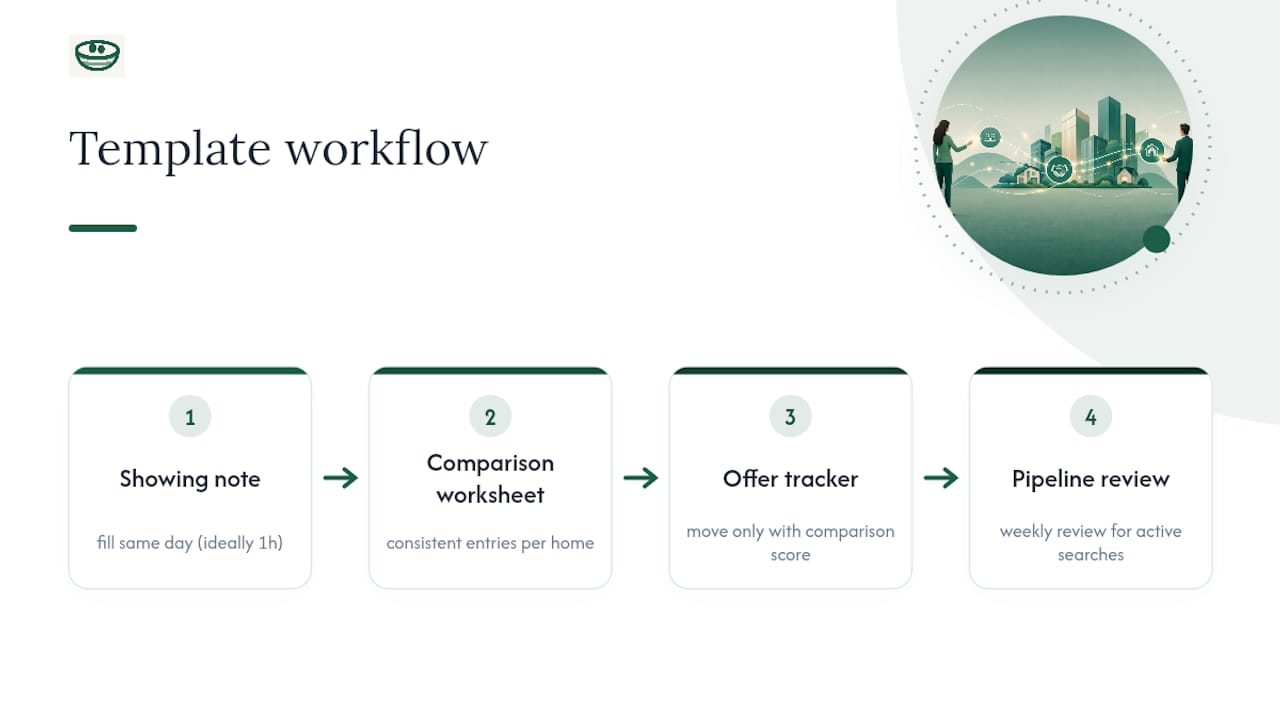
Move through four steps every single time, in this order, and the system stays fast even on a five-house Saturday.
- Capture on-site in 30 to 60 seconds using voice, before you're back in the car.
- Structure it immediately into the four showing-note buckets, ideally within the hour.
- Send a one-paragraph recap to the buyer or agent so nothing sits unread in a notes app.
- Save to a private pipeline, not a shared drive or group text visible to other agents or sellers.
Recording on-site and structuring right after preserves context and emotion that gets lost if you wait until evening. Keep the whole pipeline in a private workspace or local vault rather than a shared spreadsheet anyone with the link can open. Move a home to "offer" once it clears your comparison threshold, or to "archive" the moment a dealbreaker surfaces, don't let dead listings clutter the active list.
Pro Tip: Archive aggressively. A pipeline with 40 "maybe" homes is worse than no pipeline at all, because you stop trusting your own notes.
How Should the First Week of a Buyer-Agent Partnership Go?
Start with the buyer questionnaire, not a showing, so both sides know what they're actually looking for before wasting a Saturday on the wrong houses.
- Cover budget, must-haves, no-go items, and preferred communication style in the first consultation.
- Confirm financial pre-approval status and target neighborhoods before scheduling anything.
- Set a first-week agenda: consultation, two to three initial showings, a check-in call.
A detailed buyer questionnaire at the outset keeps agents from burning showings on homes that were never a real fit. That first-week rhythm, talk, tour, check in, becomes the cadence for the rest of the search.
Private Collaboration Rules and Documentation Discipline
Privacy is the feature that makes candid notes possible in the first place. A buyer who knows their "this kitchen is ugly but the bones are good" comment is visible only to their agent will write something useful. A buyer who suspects a listing agent, a seller, or a public platform might see it will write something bland and useless instead.
That means a few rules are worth setting explicitly at the start of a partnership, not assuming everyone agrees on them by default:
- Notes stay private by default. Nobody outside the buyer-agent relationship sees showing notes or comparison scores unless the buyer chooses to share them.
- Written records replace verbal agreements on anything with a deadline attached, price strategy, contingency waivers, response commitments.
- Signatures matter for anything binding. A verbal "yes, that works" on a counteroffer isn't the same as a signed acknowledgment, and the gap between the two is where disputes start.
- Confidentiality extends to third parties. Lenders and inspectors get what they need to do their job, not a copy of every note from every showing.
Documenting offers and responses with timestamps and saving records as they happen, rather than reconstructing a timeline after a dispute starts, is what actually protects both sides. The discipline isn't complicated. It's just consistent: write it down, timestamp it, keep it private, and don't let a verbal exchange stand in for a document when money or deadlines are involved.
Best Practices for Using Realtor Collaboration Templates
Templates fail when they're treated as paperwork instead of a working system, and the difference shows up fast.
Fill in the showing note the same day, ideally within the hour. A memory anchor written 48 hours later isn't a memory anchor anymore, it's a guess dressed up as a note. Consistency matters more than completeness: a comparison worksheet with five rows filled honestly for every home beats one with twelve rows filled thoroughly for two homes and left blank for the rest.
Review the pipeline together on a set cadence, weekly works for most active searches, rather than only when a decision is urgent. This is when a buyer's "maybe" softens into a "no" or hardens into a "let's write an offer," and catching that shift early keeps the whole search moving instead of stalling on homes nobody's actually excited about anymore.
Keep the four templates connected rather than treating them as separate documents. A showing note should feed directly into the comparison worksheet's scores. A comparison worksheet score should be the reason a home moves to the offer tracker at all. If a home lands in the offer tracker without a paper trail showing why, something got skipped, and it's usually the step that would've caught a red flag.
One habit worth adopting from day one: normalize your rubric before you're emotionally attached to a house. It's far easier to agree that "resale risk" gets weighted heavily when you're looking at houses in the abstract than after you've fallen for one with a busy road out front.
Common Pitfalls When Collaborating With These Templates
The most common failure is a stale pipeline: homes sit in "maybe" for weeks because nobody archived them after the dealbreaker surfaced. That clutter makes every future comparison harder, because you're now weighing real contenders against ghosts.
A second pitfall is inconsistent scoring. If a buyer scores one home generously because they toured it first and were excited, then scores a similar home harshly because they were tired on a Sunday afternoon showing, the comparison worksheet stops meaning anything. The fix is the rubric, applied the same way every time, not adjusted based on mood.
Third, skipping the written record on verbal agreements. A seller's agent says "we'll hold the counteroffer open until Thursday" on a phone call, nobody writes it down, and by Wednesday there's a dispute about what was actually said. Written communication is often the deciding factor when a disagreement like this reaches negotiation or arbitration.
Fourth, oversharing. Buyers sometimes forward their private notes to a friend or family member for a second opinion, not realizing that once a note leaves the private workspace, it's no longer private. Keep sharing intentional and limited.
Fifth, treating the questionnaire as a one-time form instead of a living document. Priorities shift after the fifth showing, a "must-have" garage can turn into a "nice-to-have" once budget reality sets in. Revisit it, don't just file it away after the first meeting.
Customizing Templates for Different Buyer Situations
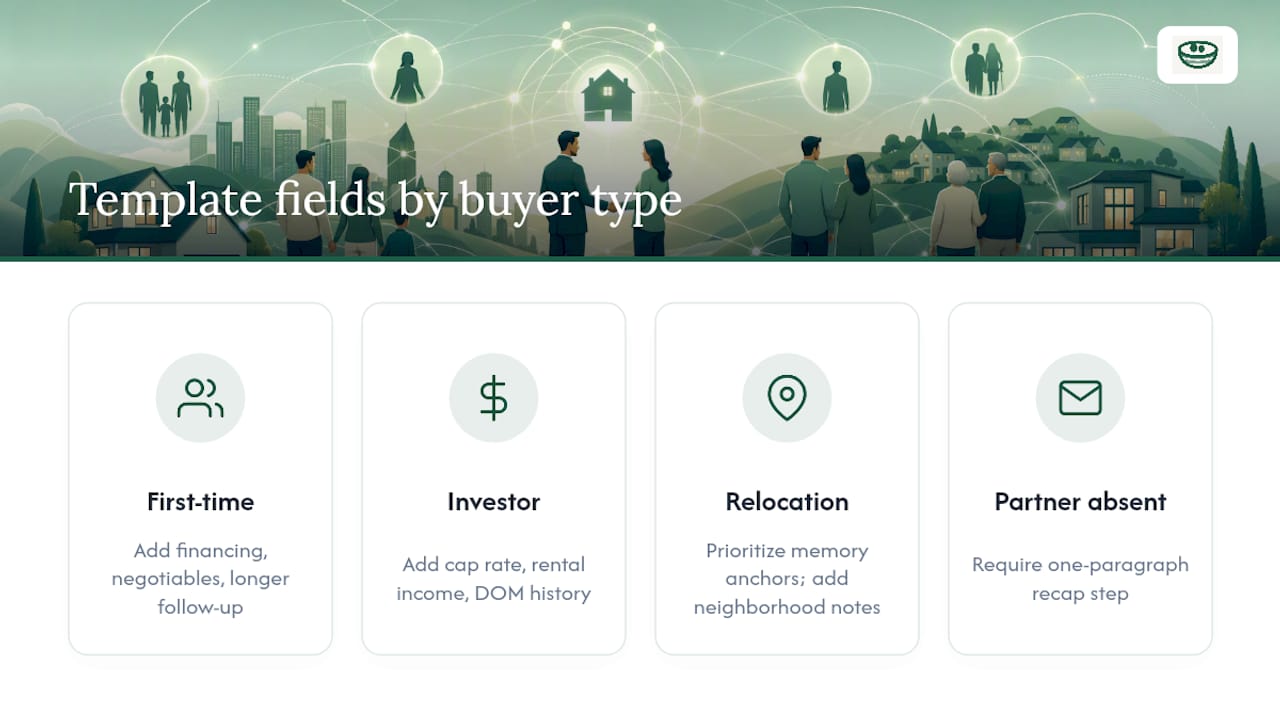
A first-time buyer and an investor touring rental properties need different fields on the same basic template, and forcing one format onto both wastes effort.
For a first-time buyer, add rows for financing education, questions about what's negotiable, and a longer follow-up action field, since first-timers tend to have more questions after each showing than repeat buyers. For an investor or repeat buyer, strip that down and add cap rate, estimated rental income, and days-on-market history instead, the emotional reaction fields matter less than the numbers.
Relocation buyers touring from out of state need a heavier weight on the memory anchor bucket, since they're often seeing six homes in two days and won't have the luxury of a second look before deciding. Add a "neighborhood context" field capturing things a local buyer would already know: noise from a nearby road, school boundary lines, flood zone status.
For a buyer working with a partner who can't attend every showing, the one-paragraph recap step in the capture workflow becomes essential rather than optional, it's the only way the absent partner stays in the loop without watching every walkthrough video.
The comparison worksheet flexes the same way. A buyer prioritizing school districts weights that row heavier in their own scoring; a buyer focused on resale in five years weights resale risk instead. The rows stay the same across clients, but which ones actually drive the final decision should shift to match what that specific buyer told you in the questionnaire.
Connecting Templates to CRM and Real Estate Software
Templates work best as a layer that feeds into, rather than replaces, the tools an agent already runs a business on.
A CRM tracks the business relationship, lead source, transaction stage, commission details. The templates in this pack track something a CRM was never built for: the buyer's actual impressions of specific homes. Trying to force showing notes into free-text CRM fields usually produces exactly the mess this pack is designed to avoid, notes get buried under unrelated fields, and nothing's structured enough to compare later.
The practical approach is to keep the two systems adjacent. Log the transaction milestones in the CRM as they always have been. Keep the showing notes, comparison worksheet, and offer tracker in a dedicated private workspace built for that purpose, then reference the outcome, "offer submitted," "under contract", back in the CRM once it happens. NestNoted's Home Search Dashboard is built specifically for that adjacent layer, syncing listing data from platforms like Zillow and Redfin so the comparison worksheet populates with real listing details instead of manual entry.
For agents managing multiple buyers at once, this separation also protects confidentiality. A CRM often has several team members with access. A private workspace scoped to a single buyer-agent relationship doesn't, which matters when a buyer's honest notes about a home are things they'd never want a colleague or the listing agent to stumble across.
What Does Successful Template-Based Collaboration Look Like?
Picture a buyer touring eight homes over three weekends. Without structure, that buyer remembers three houses clearly, has vague impressions of the rest, and ends up circling back to ask the agent "wait, which one had the finished basement?" With the template pack in place, that same search produces eight showing notes, a comparison worksheet ranking all eight on the same six criteria, and a clear top-three by the end of week two.
The pattern that separates a smooth search from a chaotic one usually isn't the number of homes toured, it's whether the notes from house two are still legible by the time house seven happens. A buyer-agent pair using structured showing notes and a shared comparison worksheet can move from tour to offer in days rather than another round of "let's think about it," because the decision signal was already logged the day of the showing, not reconstructed from memory a week later.
The offer stage benefits the same way. A buyer who's tracked three prior offers in a structured tracker, price, contingencies, seller response, walks into the fourth negotiation knowing exactly what's worked and what's stalled deals before. That's the compounding value of the template pack: each showing and each offer makes the next one faster to evaluate, because the record exists to compare against.
Author Perspective: What Actually Changes Buyer Decisions
Structure removes noise from decisions that are otherwise made on adrenaline and fatigue. The real value of these templates isn't organization for its own sake, it's that privacy lets buyers write down what they actually think, not the polished version they'd say out loud to a listing agent.
— Antony
How Nestnoted Turns These Templates Into a Private Workspace
Nestnoted is the private workspace built specifically to run this template pack without spreadsheets falling apart by house number twelve. Every core piece, the showing note, the comparison worksheet, the offer tracker, lives inside one account, and privacy is on by default, so candid notes never risk becoming a listing agent's talking point or a seller's leverage.
The platform syncs listing data directly from Zillow and Redfin, so your comparison worksheet fills in property details automatically instead of you retyping square footage and tax history by hand. Price drop alerts flag when a home on your shortlist gets cheaper, and shared workspaces let a buyer and agent, or two partners house hunting together, see the same pipeline without emailing spreadsheets back and forth.
Getting started takes one step: create a free account and import your current shortlist, or capture your very next showing directly into the Home Search Dashboard. If you're already mid-search with notes scattered across texts and a notes app, that's the fastest way to consolidate them into something you can actually compare.
Sources
- How to Organize Real Estate Showing Notes for Buyer Clients | ShowingRecap
- Mastering buyer representation in today's market | Florida Realtors Magazine