

A buyer's property pipeline is the private, stage-by-stage tracking system you use to move homes from "saved" through "toured," "rated," "offer made," "under contract," and finally "closed." The single best thing you can do right now is set up a private-by-default workspace where every tour note, photo, comp, and offer deadline lives in one place. HUD's homebuying guidance supports checklist-based pipelines as the standard framework for navigating the process. Tools like Nestnoted and feeds from Zillow and Redfin make that workspace practical from day one.
Key Takeaways
A structured buyer's property pipeline, used consistently from the first saved listing through closing, is the single most reliable way to stay decisive across a four-to-seven-month search.
| Point | Details |
|---|---|
| Define rating rules first | Write your 1–5 criteria before tour one to prevent rating drift across a long search. |
| Capture parcel-level data | Add APN, county GIS, and permit history before submitting any offer. |
| Track every offer deadline | Set absolute calendar alerts and relative countdowns for every contingency and response window. |
| Keep candid notes private | Negotiation intelligence belongs in a private workspace, shared with your agent only on your terms. |
| Nestnoted as your pipeline | Free private workspace with Zillow/Redfin sync, side-by-side comparisons, and role-based agent sharing. |
Table of Contents
- What does a property pipeline for buyers look like?
- Which fields and rating system actually matter?
- How do you run the day-to-day workflow?
- How do you track offers, contingencies, and deadlines?
- How do syncing, price alerts, and privacy controls work?
- Starter pipeline template and side-by-side comparison
- How do you pick the right pipeline tool?
- How to set up your first private pipeline in one hour
- Why private pipelines change how buyers decide
- Nestnoted: the private pipeline serious buyers actually use
- Sources
What does a property pipeline for buyers look like?
The pipeline has eight stages. Each one has a clear entry trigger and a minimal set of fields to capture before you move on.
- Saved: Address, source link (Zillow, Redfin, MLS), list price, square footage, days on market. Entry trigger: you clicked "save" or your agent flagged it.
- Scheduled for tour: Confirmed showing date/time, agent contact, driving route, pre-tour checklist printed or loaded.
- Toured (raw notes/photos): Exterior shot, street view, parking, roof/HVAC condition, any red-flag areas. Add a rough first-impression rating before you leave the driveway.
- Short-listed/rated: Final 1–5 rating applied, comps pulled, repair estimate roughed in, disclosures requested.
- Offer drafted: Offer amount, earnest money, contingencies, response deadline, agent review notes.
- Offer submitted: Submission timestamp, seller's agent contact, counter-offer log.
- Under contract/due diligence: Inspection date, appraisal order date, contingency deadlines, escrow contact.
- Closed: Final purchase price, closing date, key-transfer notes, post-close contacts.
In a balanced market, buyers typically spend one to two weeks in the "saved" and "scheduled" stages per property. Opendoor's home-buying checklist puts the full search-to-close window at several months, which means the pipeline needs to handle dozens of properties simultaneously without collapsing into a mess of browser tabs and text threads.
Which fields and rating system actually matter?
Track these core fields on every listing: address and APN, source link, photos, tour date, agent contact, list price, comps (average price per square foot), repair estimate, disclosure status, mortgage notes, offer status, and next-action deadline. That's the floor. Parcel-level verification — APN, county GIS, permit history, FEMA flood zone — belongs in the pipeline before any offer goes out.
For ratings, a simple 1–5 scale works if you write down what each number means before you tour your first home:
- 5: Must-act-now. Meets every must-have; you'd be upset to lose it.
- 4: Strong fit. One or two fixable issues.
- 3: Possible. Needs more data or a second visit.
- 2: Unlikely. A significant problem that may be dealbreaker.
- 1: Drop it. Move on.
Pro Tip: Write your rating criteria in a shared note before your first tour and never change the definitions mid-search. Rating drift — where a "3" in week one becomes a "4" in week six because your standards shifted — is one of the most common reasons buyers circle back to homes they already rejected.
How do you run the day-to-day workflow?
A pipeline only works if it becomes a habit. Here's the sequence that keeps it operational:
- Pre-tour prep (the night before): Confirm MLS data matches the listing, map the route, load your property viewing checklist, and note any questions for the seller's agent.
- Arrive and log the exterior: Photograph the street, facade, driveway, and any visible roof or foundation issues before you walk in. First impressions fade fast.
- During the tour: Capture photos of HVAC, electrical panel, water heater, and any problem areas. Answer three quick rating prompts: structure/bones, layout fit, neighborhood feel.
- Measure what matters: Ceiling height in the primary bedroom, garage depth, and any room where furniture placement is a real question.
- Immediately post-tour (within 30 minutes): Sync notes, apply your rating, flag follow-ups (disclosure request, repair quote, second showing), and update the pipeline stage.
- Private vs. shared notes: Keep candid impressions private. Share only the listing card and your rating summary with your agent. Sensitive negotiation notes stay locked until you're ready to present them.
Realtigence's search best-practices guide recommends treating your saved-search profile as a living document with weekly reviews and periodic agent check-ins, which maps directly to the pipeline's "saved" and "short-listed" stages.
How do you track offers, contingencies, and deadlines?
Capture these fields the moment an offer goes out:
- Offer amount and any escalation clause ceiling
- Earnest money amount and wire-transfer deadline
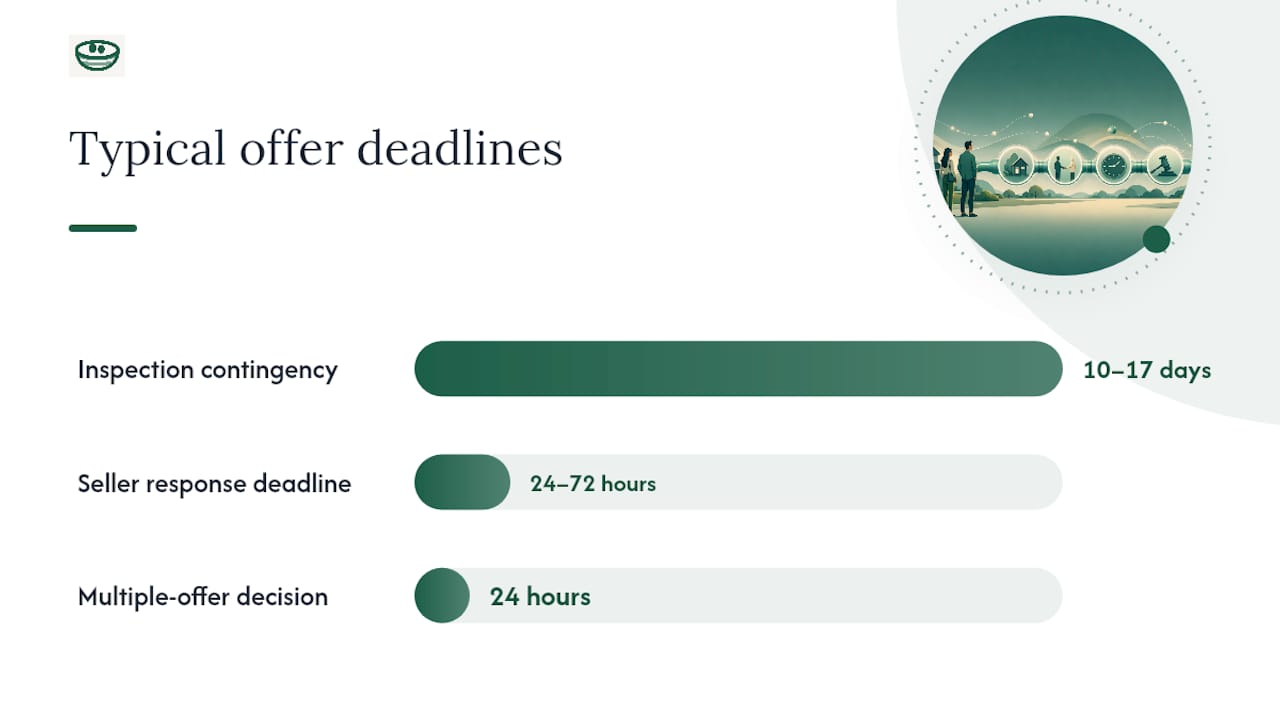
- Inspection contingency period (typically 10–17 days)
- Appraisal contingency and financing contingency deadlines
- Seller's response deadline (often 24–72 hours)
- Closing date target
- Wiring instructions verification (confirm by phone, never by email alone)
Set two reminders for every deadline: one absolute calendar alert and one relative countdown ("3 days before inspection contingency expires"). Note who must act and by when. A missed contingency deadline can cost you your earnest money or lock you into a purchase you wanted to exit.
Timeline reality check: Opendoor puts the typical search-to-close window at several months. In competitive markets, that window compresses sharply — multiple-offer situations can force a 24-hour decision on a home you toured once. A pipeline with pre-filled comps, repair estimates, and a clear rating already logged is the only way to make that call confidently.
Redfin's home-buying checklist notes that a dedicated buyer's agent provides local market context and guides buyers through inspections and negotiations — which is exactly why agent collaboration fields belong in the pipeline alongside your own notes. For practical offer-submission tactics, this offer negotiation guide covers wording and counter-offer strategy in detail.
How do syncing, price alerts, and privacy controls work?
Your pipeline is only as current as its data. Practical import options include:
- MLS via your agent: The most accurate source; your agent pushes listings directly into your shared workspace.
- Zillow and Redfin feeds: Saved-search alerts deliver new listings and price drops automatically; Nestnoted syncs these feeds so you don't re-enter data by hand.
- Browser bookmarklet or extension: Clip a listing page into your pipeline without leaving the browser.
- CSV import: If you started in a spreadsheet, export it and import the columns into your pipeline tool.
On privacy: keep candid tour notes private by default. Share only selected listing cards with co-buyers or your agent. Anonymize negotiation strategy notes until you're ready to present them. Before you commit to any tool, confirm it lets you export your full dataset as a CSV or PDF — your records belong to you, not the platform.
Starter pipeline template and side-by-side comparison
Copy this structure into your pipeline or spreadsheet:
| Address/APN | Source link | Tour date | Rating (1–5) | Price | Comps avg $/sqft | Est. repairs | Offer status | Next action | Agent contact |
|---|---|---|---|---|---|---|---|---|---|
| — | Zillow link | Mar 15 | 4 | $485000 | $310 | $8000 | None yet | Request disclosures | Jane D. |
For decision meetings, a side-by-side comparison chart needs these columns: must-haves met (Y/N per item), dealbreakers present (Y/N), list price, estimated total cost to close, rating, and one-line gut note. A home comparison chart guide shows how to run that meeting efficiently.
The CFPB's home-loan toolkit includes financial worksheets worth converting into pipeline fields for the "offer drafted" and "under contract" stages.
Pro Tip: Add a "total cost to close" column that sums list price, estimated repairs, closing costs, and any HOA reserves. That single number cuts through the emotional pull of a beautiful kitchen faster than any rating scale.
How do you pick the right pipeline tool?
Decision checklist before you commit to any tool:
- Private-by-default notes (not public or shared without your action)
- Zillow/Redfin sync or easy import
- Side-by-side property comparison view
- Deadline reminders with calendar integration
- Photo attachments per listing
- Agent collaboration with role controls (read-only vs. edit)
- Data export (CSV or PDF)
- Free tier or low-cost entry
Red flags: forced public sharing of notes, no data export option, missing deadline reminders, no photo support, no agent collaboration features.
A spreadsheet works for five listings. Past that, the manual upkeep eats the time you should spend evaluating homes.
How to set up your first private pipeline in one hour
- Create your account and set the workspace to private.
- Import five saved listings from Zillow or Redfin (or paste addresses manually).
- Add at least two photos and an initial rating to each listing.
- Set three reminders: one price-drop alert, one tour follow-up, one offer-deadline placeholder.
- Invite your agent with read-only or edit access, depending on how you collaborate.
First-week actions: Review your saved searches every morning, refine your rating criteria after your first two tours, schedule three follow-up calls with your agent, and export a comparison sheet before your next decision meeting.
Common setup snags: missing APN (look it up on your county assessor's site), duplicate imports from both Zillow and Redfin for the same property (merge by address), and calendar sync issues (set reminders in the app's own system rather than relying on a third-party calendar export until you've confirmed the integration works). A mortgage document checklist is worth loading into the pipeline alongside your lender notes — preapproval letters typically last 60–90 days, so track expiration dates the same way you track offer deadlines.
Why private pipelines change how buyers decide
The biggest mistake buyers make isn't moving too fast. It's moving without a record. After touring fifteen homes over six weeks, memory compresses everything into a blur of granite countertops and vague feelings. The buyer who wrote nothing down is the one who makes a rushed offer on home number sixteen because they can't remember why they passed on home number seven.

A private pipeline prevents that. When every tour has a rating, a photo set, and a candid note you wrote in the parking lot, you can reconstruct your reasoning at 11 PM before a deadline. You can show your agent exactly why you rated a home a 3 instead of a 4. You can compare two finalists side by side without relying on anyone's memory.
The privacy piece matters more than most buyers expect. Candid notes ("seller seems motivated, deferred maintenance everywhere") are negotiating intelligence. They shouldn't live in a shared spreadsheet or a text thread your agent can forward. A private-by-default workspace keeps that intelligence where it belongs: with you, until you choose to share it.
Nestnoted's property viewing checklist and pipeline features are a direct implementation of this approach — private notes, structured stages, and agent collaboration on your terms.
Nestnoted: the private pipeline serious buyers actually use

Nestnoted builds every feature described in this guide into one free workspace: private-by-default notes, Zillow and Redfin sync, side-by-side comparisons, price-drop alerts, deadline reminders, and role-based sharing so your agent sees exactly what you want them to see. There's no forced public profile, no data locked behind an export paywall, and no spreadsheet to maintain by hand.
The free tier covers everything a serious buyer needs through closing. Import your first five listings, add your rating criteria, and invite your agent in under an hour. Start your private pipeline at Nestnoted and use the starter template from this guide to hit the ground running.
Sources
- The Ultimate Home Buying Checklist In 15 Steps | Redfin
- HUD — Buying a home
- Realtigence
- First-Time Homebuyer's Guide | How to Research Homes Online
- Home buying checklist | Opendoor