

Use Zillow when you're still figuring out what you want. Use Realtor.com when you're close to making an offer. That's the short version, and it holds up. Zillow draws a substantially larger monthly visitor count than Realtor.com, which tells you something about where casual browsers go. But traffic volume isn't listing accuracy. Realtor.com pulls directly from hundreds of local MLS feeds, which means the status you see there is more likely to reflect reality than what you'd find on an aggregator-dependent platform.
The recommended workflow: start on Zillow for broad market discovery, cross-check active listings on Realtor.com as you get serious, then confirm status and pricing with your agent before you write anything.
- Early discovery: Zillow's inventory breadth (MLS + FSBO + off-market) gives you the widest view.
- Offer prep: Realtor.com's MLS-direct feeds reduce the risk of chasing a listing that went pending yesterday.
- Final check: Neither portal replaces a licensed agent for transaction-critical verification.
Table of Contents
- How does Zillow work, and what can buyers expect from it?
- How does Realtor.com work, and who gets the most value from it?
- Zillow vs Realtor.com: side-by-side comparison
- How do listing data and MLS access actually differ between the two?
- What do agents pay, and how do the lead models compare?
- How do search features, valuation tools, and mobile UX compare?
- Which platform should you use at each stage of your home search?
- What changed in 2026? The Zillow–Realtor.com preview-listings sync
- Key Takeaways
- The portals are tools, not advisors
- Nestnoted keeps your search organized where the portals leave off
- Useful sources and further reading
How does Zillow work, and what can buyers expect from it?
Zillow built its audience by making real estate browsing feel easy. It aggregates listings from MLS syndication, direct agent and broker uploads, FSBO postings, and off-market items like "Make Me Move" properties. The result is the broadest inventory of any major portal for casual browsers, which is exactly why it became the default starting point for most American home searches.

The features buyers actually use: map-based search with draw-your-own-boundary tools, price history graphs, saved searches with email alerts, 3D tours on select listings, and the Zestimate. That last one deserves a separate conversation (covered in the features section below), but the short version is that it's useful for ballpark context and genuinely unreliable for offer pricing.
Industry analysts describe Zillow as a "consumer super-app" for discovery, which is accurate. The platform is built around keeping you engaged with the market, not around getting you to a closing table. That distinction matters for how you interpret what you see there.
Who benefits most from Zillow: Early-stage shoppers who want to understand a market before committing, investors looking for off-market leads, and sellers who want to gauge neighborhood pricing. The trade-off is that listing status can lag, especially in fast markets where a property goes pending before the feed updates.
Zillow pros and cons at a glance:
For buyers: Wide inventory including FSBO and off-market, strong map tools, price history, 3D tours. The downside is that status accuracy depends on how quickly the listing agent or MLS feed updates Zillow's system.
For agents: Massive audience reach and brand visibility. The cost is a pay-to-play lead model (Premier Agent) that many agents find expensive relative to conversion rates.
How does Realtor.com work, and who gets the most value from it?
Realtor.com's core advantage is its data pipeline. The platform has a direct affiliation with the National Association of Realtors® (NAR) and pulls from hundreds of local MLS feeds, which gives it a structural edge on listing accuracy and status freshness compared with platforms that rely on third-party aggregation.
What that means practically: when a listing goes from Active to Pending, Realtor.com tends to reflect that change faster. In a market where good homes get multiple offers within 48 hours, that speed matters.
Core features buyers use on Realtor.com:
- MLS-accurate status labels with faster update cadence than most aggregators
- Neighborhood and school data integrated into listing pages
- Agent directory with verified credentials and transaction history
- Transaction-focused filters like days on market, open house schedule, and price reduction history
The trade-offs are real. Realtor.com carries less FSBO and off-market inventory than Zillow, so if you're specifically hunting pre-market deals or owner-direct listings, you'll find fewer of them here. The interface is also more utilitarian than Zillow's, which some buyers find less engaging during early browsing.
For agents, Realtor.com tends to attract buyers who are further along in their search, which can mean higher-intent leads. The platform's lead products differ from Zillow's model, covered in the agent tools section below.
Redfin is worth a brief mention here: it operates as a tech-brokerage hybrid with its own agents and lower listing fees in many markets, which creates a different kind of bias in its inventory and search results. It's a legitimate alternative for buyers who want an integrated agent-and-search experience, but it's a different product category than either Zillow or Realtor.com.
Zillow vs Realtor.com: side-by-side comparison
| Dimension | Zillow | Realtor.com |
|---|---|---|
| Listing accuracy & freshness | MLS syndication + aggregation; status lag possible | Direct MLS feeds; faster status updates |
| Inventory breadth | Widest: MLS + FSBO + off-market/pre-market | Primarily MLS-listed; limited FSBO/off-market |
| Valuation tool | Zestimate (AVM); less reliable in non-disclosure/rural markets | Realtor estimate; similar AVM limitations apply |
| Search & mobile UX | Draw-boundary maps, 3D tours, strong visual browsing | Transaction-focused filters, school/neighborhood data |
| Agent tools & lead model | Premier Agent paid placement; broad audience reach | Higher-intent lead products; NAR-affiliated agent directory |
| Agent advertising cost | Variable; zip-code auction model drives costs up in competitive areas | Variable; lead product pricing not publicly listed |
| Best for | Early discovery, FSBO/off-market, broad market research | Offer prep, MLS-verified status, transaction-ready buyers |
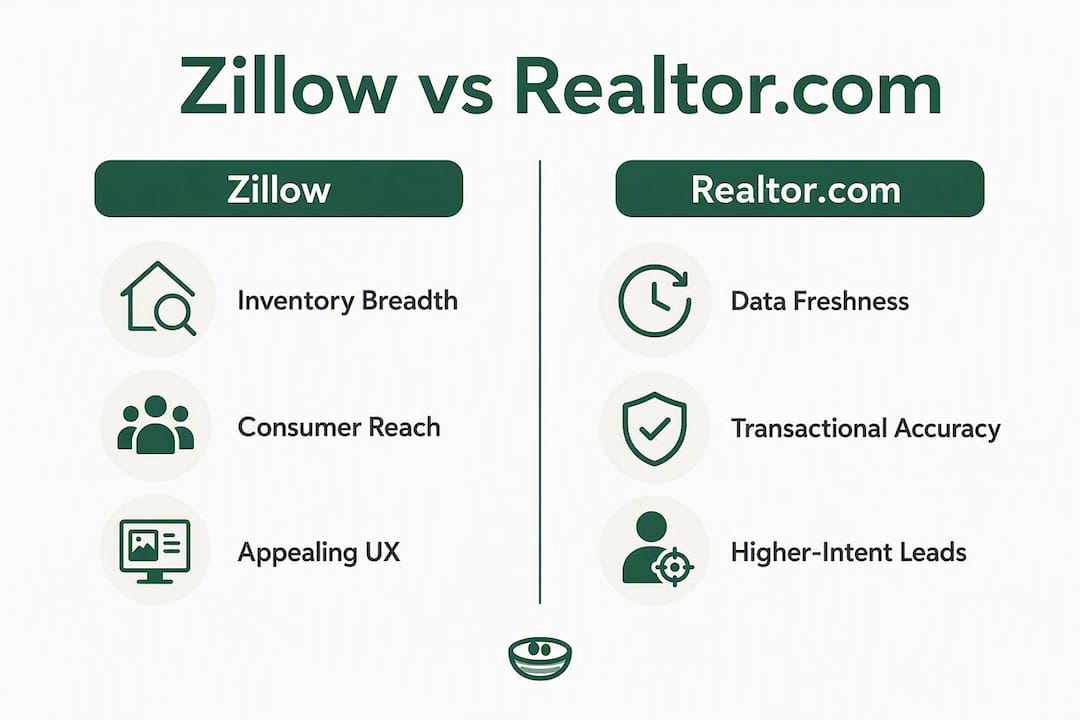
Takeaway row: Realtor.com wins on data freshness and transactional accuracy. Zillow wins on inventory breadth and consumer reach. Neither is the right answer for every stage of a search.
Regional caveat: In non-disclosure states (where sale prices aren't public record), both platforms struggle with valuation accuracy. Zestimate performance is particularly inconsistent in those markets. Always pair any AVM estimate with an agent-prepared comparative market analysis (CMA) before you price an offer.
How do listing data and MLS access actually differ between the two?
The technical difference between direct MLS feeds and aggregated syndication is worth understanding, because it explains most of the accuracy gap between these platforms.
When a listing agent marks a property Pending in their local MLS, that status change travels through a data pipeline to the portals. On a direct-feed platform like Realtor.com, that pipeline is shorter. On an aggregator, the same change may pass through a third-party syndication service before it reaches the portal's database. Realtor.com refreshes its feed multiple times per day, reducing the window during which outdated "Active" labels appear on properties that are already under contract.
That gap sounds small until you're in a hot market. A buyer who calls on a listing that went Pending six hours ago has wasted time and raised their own expectations. In markets where median days-on-market is under a week, that lag is a real problem.
| Update factor | Realtor.com | Zillow |
|---|---|---|
| Data source | Direct MLS feeds (hundreds of local boards) | MLS syndication + third-party aggregation |
| Update frequency | Multiple times per day | Varies by market and feed agreement |
| FSBO/off-market coverage | Limited | Broad |
| Status accuracy risk | Lower (but not zero) | Higher in fast markets |
Even with MLS-fed portals, property status labels can still lag by hours because of local MLS rules, office submission delays, and feed processing time. The practical rule: assume status can change between your last check and your agent's call. Verify before you write an offer.
Pro Tip: Set up saved searches with email alerts on both platforms. Realtor.com alerts tend to reflect status changes faster; Zillow alerts catch a wider net of new inventory including off-market additions.
What do agents pay, and how do the lead models compare?
The business models behind these portals shape the kind of leads they generate, and agents who understand that distinction spend their budgets more efficiently.
Zillow's Premier Agent program operates on a zip-code auction model. Agents bid for ad placement within specific zip codes, and the cost per impression or lead rises with competition. In high-demand markets, the cost can be significant. The leads tend to be early-stage buyers, which means longer nurture cycles and lower immediate conversion rates. The upside is volume and brand visibility across Zillow's massive audience.
Realtor.com's agent products are structured differently, with options that include exclusive and non-exclusive lead packages. Because Realtor.com attracts buyers who are further along in their search, the leads often show higher intent. Post-NAR settlement changes in the mid-2020s shifted how agents think about portal spend, with more emphasis on lead quality over raw volume.
Key considerations for agents evaluating either platform:
- Conversion tracking is non-negotiable. Without a CRM that tags lead source, you can't calculate cost-per-closed-deal by channel.
- Zillow leads often require longer follow-up sequences because buyers are earlier in their decision cycle.
- Realtor.com leads may close faster but the platform's smaller audience means fewer total leads at the top of the funnel.
- Neither platform guarantees exclusivity in the way a referral network might; understand what you're buying before you commit.
Pro Tip: Run both channels for 90 days with identical follow-up sequences, then compare cost-per-appointment (not cost-per-lead). That single metric cuts through the noise faster than any platform's own reporting.
How do search features, valuation tools, and mobile UX compare?
Both platforms offer map-based browsing, saved searches, price history, and mobile apps. The differences are in the details, and those details add up depending on what stage of the search you're in.

Zillow's map tools are genuinely good. The draw-your-own-boundary feature lets you define an irregular search area (useful in cities where neighborhood lines don't follow zip codes), and the 3D tour integration on select listings reduces unnecessary in-person visits. Filter depth is strong: you can sort by school rating, commute time, HOA fees, and listing age.
Realtor.com's filters lean toward transaction signals: days on market, price reduction history, open house schedule, and listing agent contact. Less visual, more functional. The mobile app reflects that same orientation.
On valuation tools, both platforms use automated valuation models (AVMs). An AVM is an algorithm that estimates property value based on recent sales, public records, and property characteristics. Zillow's Zestimate is the most widely recognized AVM in the U.S., but it can be unreliable in non-disclosure states or rural markets where sale data is sparse. Realtor.com's estimate carries similar algorithmic limitations.
The rule that saves buyers money: An AVM is a starting point for curiosity, not a number to anchor your offer on. A licensed agent's CMA, built from actual comparable sales in your specific neighborhood, is what you need before you write a price. The gap between an AVM and a CMA can be tens of thousands of dollars in either direction.
For mobile UX, Zillow's app is built for browsing. It's visually engaging and easy to lose an hour in. Realtor.com's app is built for checking. You open it to verify a status or pull up a listing before a showing. Both are well-rated, but they serve different moments in the search process.
Which platform should you use at each stage of your home search?
The right answer changes as your search matures. Here's a practical sequence:
- Early discovery (weeks 1–4): Use Zillow. Set up saved searches across your target neighborhoods, enable alerts, and explore the map tools to understand price ranges and inventory levels. Include FSBO and off-market filters to see the full picture.
- Market comparison (weeks 4–8): Start cross-referencing on Realtor.com. When you find a listing you like on Zillow, check its status on Realtor.com to confirm it's still active. Use Realtor.com's neighborhood and school data to compare areas side by side.
- Pre-offer diligence: Prioritize MLS-verified listings. Pull days-on-market history, price reduction dates, and comparable sales from your agent. Do not rely on Zestimate or any AVM to set your offer price. A licensed Realtor's guidance at this stage is worth more than any portal feature.
- Offer-ready: Confirm listing status directly with your agent before submitting. In fast markets, assume the status you saw this morning may have changed. Your agent's MLS access is the most current source available.
- Agent lead generation: Allocate budget to both platforms in test mode, track conversions by source, and adjust spend based on cost-per-appointment rather than cost-per-lead. Use a private tracker like Nestnoted to manage multiple active buyer relationships and offer timelines without losing details across email threads and spreadsheets.
For buyers managing more than five or six properties at once, a home comparison chart or private tracking tool becomes genuinely useful. The portals show you listings; they don't help you remember which house had the foundation issue or which one your partner loved but you weren't sure about.
What changed in 2026? The Zillow–Realtor.com preview-listings sync
The most significant platform development of 2026 is the collaboration between Zillow and Realtor.com on pre-market inventory. In May 2026, both platforms announced a synchronization of "Preview Listings" so that pre-market properties would appear on both portals simultaneously, rather than being siloed on whichever platform the listing agent chose first.
The stated goal is increased pre-market transparency. Before this change, a seller who listed a "coming soon" property on Zillow's pre-market feed might not have that listing visible to buyers searching on Realtor.com, and vice versa. The sync closes that gap for the pre-market category.
What it doesn't change: the sync applies to preview/pre-market listings, not to the main MLS active feed. The collaboration increases pre-market visibility across portals, but it does not replace MLS-verified status for offer timing. A property that moves from Preview to Active to Pending still travels through the same MLS pipeline it always did, with the same potential for status lag.
For buyers, the practical effect is that you'll see more pre-market inventory on both platforms without having to monitor both separately. For agents, it means pre-market listings get broader exposure from day one. The caveat remains: verify transactional status with your agent before acting on anything you see in a pre-market feed.
Key Takeaways
Realtor.com wins on MLS data freshness and transactional accuracy; Zillow wins on inventory breadth and consumer reach — use both together, verify status with your agent, and track your shortlist privately with Nestnoted.
| Point | Details |
|---|---|
| Use Zillow for discovery | Zillow's ~210M monthly visits and broad inventory (MLS + FSBO + off-market) make it the best starting point. |
| Use Realtor.com for accuracy | Direct MLS feeds and multiple daily refreshes reduce the risk of chasing already-pending listings. |
| Never rely on AVMs alone | Zestimate and similar tools are unreliable in non-disclosure or rural markets; always get an agent CMA before pricing an offer. |
| 2026 preview sync helps, but has limits | The Zillow–Realtor.com preview-listings sync improves pre-market visibility but doesn't fix MLS status lag for active listings. |
| Track privately with Nestnoted | Nestnoted lets buyers organize impressions, compare properties side by side, and manage offers without losing details across platforms. |
The portals are tools, not advisors
The conventional wisdom in real estate is that you pick one portal and stick with it. That's wrong, and the data makes it obvious. Zillow and Realtor.com are built for different moments in the same search. Using only Zillow means you're browsing on a platform optimized for engagement, not accuracy. Using only Realtor.com means you're missing FSBO inventory and off-market leads that don't appear in MLS feeds.
What actually gets buyers into trouble is treating either portal as a source of truth for transactional decisions. The Zestimate is not a CMA. An "Active" label on any portal is not a guarantee the property is still available. These platforms are research tools, and the moment you move from research to action, you need a licensed agent with direct MLS access.
The 2026 preview-listings sync is a genuine improvement for pre-market transparency, but it's worth noting what it doesn't solve: the fundamental tension between a portal's business model (keep users engaged, sell ad placements) and a buyer's actual need (accurate, timely data for a high-stakes financial decision). Those incentives don't fully align, and they probably never will. The portals are better than they've ever been. They're still not a substitute for professional guidance at the offer stage.
For buyers managing a serious search across multiple properties, the gap between what portals offer and what you actually need to stay organized is real. That's where a private tracking layer adds something the portals can't.
Nestnoted keeps your search organized where the portals leave off
Both Zillow and Realtor.com show you listings. Neither one helps you remember what you actually thought about the house with the small backyard, or which offer you submitted last Tuesday, or why you passed on the one in the good school district. That's the gap Nestnoted fills.

Nestnoted is a private listing tracker built for serious buyers and the agents who work with them. You can sync saved listings from Zillow and Redfin, log private notes and impressions after each tour, run side-by-side property comparisons, and track offers in one place without anything leaking into a public review or a shared spreadsheet. The AI assistant lets you query your own notes ("which properties had a garage and were under $450K?") without digging through emails.
For agents, the shared workspace and offer-tracking features mean you and your buyer are working from the same organized record, not a chain of texts. Nestnoted is free to start. Sign up at nestnoted.com and connect it to your existing portal searches today.
Useful sources and further reading
The sources below back the claims in this article and are worth bookmarking for your own research.
- Zillow and Realtor.com preview-listings announcement (May 2026) — the primary source for the 2026 pre-market sync collaboration
- Best Real Estate Websites, Ranked for 2026 (ibuyer.com) — traffic figures, platform rankings, and agent cost context
- Zillow vs. Realtor.com vs. Redfin: which is best? (reddoormetro.com) — inventory breadth comparison across the three major portals
- Zillow vs. Realtor.com: 2026 comparison (realestateskills.com) — update frequency analysis and platform feature breakdown
- Zillow vs. Realtor.com analyst perspective (coraly.ai) — industry framing of Zillow as consumer super-app vs Realtor.com as brokerage-adjacent
- Zillow Zestimate documentation — AVM methodology and known limitations
- Realtor.com guidance and industry resources — MLS feed practices and listing status guidance
- Why a residential Realtor matters in home buying (hausgrp.com) — practical explanation of when portal data needs agent verification
For transaction-critical checks, consult your local MLS through a licensed agent. Portal data is a starting point; your agent's direct MLS access is the authoritative source for status, price history, and comparable sales.