

Private home buying means running your search through a confidential property-management workspace, not through public listing sites or shared spreadsheets. It has nothing to do with buying without an agent. If you're touring more than a handful of homes, start centralizing your photos, voice notes, and offer details in a privacy-first tool like NestNoted before your next showing.
TL;DR:
- Using a private workspace like NestNoted helps maintain unfiltered, confidential notes, reducing memory confusion and protecting sensitive impressions during house tours.
- Recording and scoring each property immediately after visits ensures consistent comparisons and prevents emotional bias from clouding judgment.
- Organizing property data through fixed fields and tagging by category allows quick side-by-side analysis and easy retrieval of key details, like red flags and costs.
- Layered permission levels give your agent controlled access to notes and findings, keeping negotiations strategic and private until you're ready.
- Tracking offers with detailed data, deadlines, and associated documents prevents missed contingencies and simplifies post-closing documentation.
Table of Contents
- Why a Private Property Workspace Beats Spreadsheets and Text Threads
- What To Capture Before, During, and After Every Showing
- How to Organize and Compare Homes Without Losing the Details
- Bringing Your Agent In Without Handing Over Everything
- Recording Offers So Nothing Slips Through the Cracks
- How to Confirm a Workspace Actually Keeps Your Notes Private
- A Compact Workflow You Can Copy Today
- Getting Started With NestNoted's Private Workflow
- Sources
Why a Private Property Workspace Beats Spreadsheets and Text Threads
By the fifth or sixth showing, houses start blending together. The kitchen with the odd layout merges with the one that had the strange smell in the basement. A dedicated workspace fixes that by locking each impression to its property the moment you have it, before your memory does the editing for you.
There's a second, less obvious benefit: privacy changes what you're willing to write down. Notes that live in a group text or a shared Google Sheet get filtered. You soften "overpriced" to "a bit high" because a seller's agent might glimpse the screen. A private-by-default tool removes that friction entirely, which is exactly what NestNoted claims to solve for buyers who want candid, unfiltered records.
The practical payoffs stack up fast:
- You stop confusing one property's flaws with another's.
- Your negotiation notes stay yours until you decide otherwise.
- Comparing ten homes takes minutes instead of a reconstructed evening of scrolling through texts.
Adopt this the day you schedule your first tour, not after you've already lost track of house number four.
What To Capture Before, During, and After Every Showing
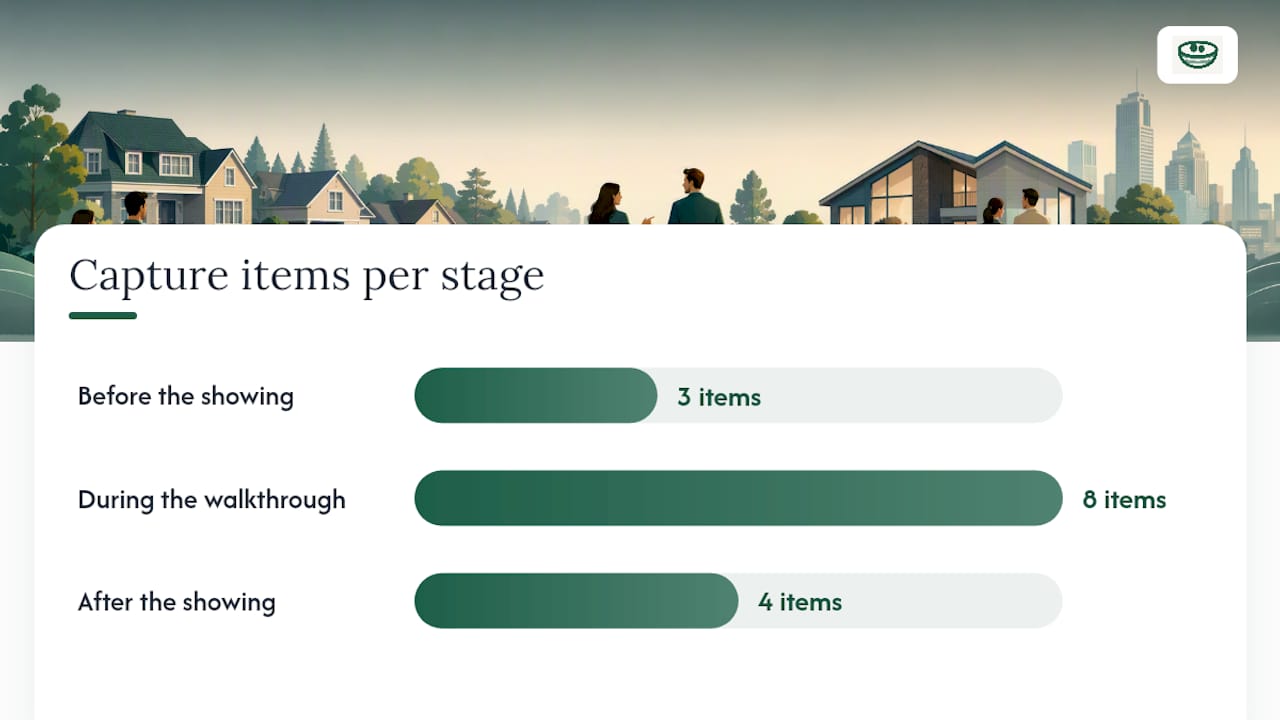
A reusable capture routine is what turns a chaotic search into a comparable one. Redfin's home buying checklist stresses preparing your finances and lining up an agent early, and that same stage-based thinking applies to what you record at each step.
Before the showing:
- Pull the listing photos and note what's conspicuously missing (no photo of the backyard usually means something).
- Map the commute at the time you'd actually drive it.
- Confirm the price fits your budget filter, including likely repair costs.
During the walkthrough:
- Photograph the street view, every main room, the kitchen, the primary bedroom, and anything that concerns you specifically.
- Record a short voice note immediately after the showing to capture fresh impressions before they fade or blend with subsequent visits.
- Note ceiling height, window count, and any measurement that matters for your furniture or plans.
- Flag red flags immediately: water stains, uneven floors, a suspiciously fresh paint patch.
After the showing, score the property while it's fresh. A 1 to 5 scoring method across categories keeps comparisons honest instead of emotional. For each home, log:
- Overall score (1 to 5)
- Best feature
- Main concern
- One line answering "would I offer on this today?"
Paste that template into your workspace once, and reuse it for every property you tour.
How to Organize and Compare Homes Without Losing the Details
Consistent fields are what make ten properties comparable instead of just ten separate folders. A workable data model per property includes quick facts (price, square footage, lot size), condition notes, photos, voice-note transcripts, an open task list, and offer history if you've made one.
Tag properties by category rather than by address alone: "must-have" for the ones with your non-negotiables, "no-go" for hard rejections, and a renovation-level tag (turnkey, cosmetic, gut renovation) so you're not reopening every listing to remember which is which.
Side-by-side comparison works best with a short, fixed set of fields:
- Score (your 1 to 5 rating)
- Estimated first-year costs, including hidden fees buyers often miss
- Red-flag count
- Commute time
- Days on market
Searchable transcripts and OCR on your screenshots matter more than they sound like they should. Once a voice note gets transcribed, you can search "smell" or "foundation" across every property you've toured and pull up the exact home you were thinking of, instead of scrolling through forty photos trying to remember which kitchen had the bad layout. A comparison chart template built around these fields turns that scroll into a two-minute lookup.
Pro Tip: Tag red flags the same way every time (something like #foundation or #roof), and you'll be able to filter your entire search history by issue type when you're deciding between finalists.
Bringing Your Agent In Without Handing Over Everything
Your agent needs enough to represent you well, not your unfiltered running commentary on every seller's decorating choices. The fix is tiered permissions, not an all-or-nothing share.
Most workspaces worth using offer at least three levels: read-only access to specific properties, comment-only threads where an agent can respond without editing your original notes, and temporary share links that expire after a set window. NestNoted's dashboard approach leans on exactly this kind of layered sharing to keep buyers in control.
In practice, that means:
- Keep your raw candid notes, scores, and "would I offer" reactions private by default.
- Share a curated summary (your top three finalists, key concerns, target price) only when you're ready to negotiate.
- Use expiring links for one-off collaboration, like sending an inspector's findings to your agent for a single conversation.
- Check in with your agent weekly during active touring, and daily once an offer is in motion.
The goal is control over timing. You decide when a note goes from a private impression to a shared strategy, not the platform.
Recording Offers So Nothing Slips Through the Cracks
An offer record needs more structure than a text message to your agent saying "we're in at $410,000." At minimum, log the offer price, deposit amount, every contingency, the offer's expiration date and time, and links to the actual documents.
- Create one offer record per property, even if you've made more than one offer over time.
- Track competing offers as separate entries if you're bidding on multiple homes simultaneously, so deadlines never collide unnoticed.
- Attach tasks and reminders for each contingency, financing deadline, and inspection window.
- Set a hard reminder two days before any deadline, not the day of.
A compact pipeline that tracks four date fields, offer date, expiry, inspection due, and finance contingency, covers most of the missed-deadline risk buyers actually face, according to NestNoted's private workflow guide. Task-based pipelines built this way reduce missed contingencies far more reliably than a shared calendar invite.
After closing, don't delete the record:
- Keep inspection reports, appraisal documents, and final measurements linked to the property.
- Hold onto your earnest money and deposit paperwork for tax and warranty purposes.
- Reference the folder during move-in planning instead of digging through email.
How to Confirm a Workspace Actually Keeps Your Notes Private
Not every tool that calls itself private actually behaves that way. Before you trust a platform with your candid notes and offer numbers, check its default settings, not its marketing page.
- Confirm new notes are private by default, not public until you manually lock them.
- Look for per-note sharing controls rather than an all-or-nothing account setting.
- Check for an activity log or audit trail showing who viewed or edited what, and when.
- Verify that shared links can expire and be revoked on demand.
- Make sure you can export or fully delete your data whenever you want.
Walk away from any platform that forces public listing pages, requires a shareable profile, or buries sharing controls so deep you can't tell what's actually visible to whom.
Pro Tip: Test the export function before you need it. If a platform makes downloading your own notes difficult, that's a sign it will make deleting them difficult too.
A Compact Workflow You Can Copy Today
The whole system boils down to five steps: capture during the tour (photos, voice note, red flags), score immediately after (1 to 5, best feature, main concern, would-I-offer), tag and file the property, review side-by-side once you hit three or more finalists, and log the offer with every contingency date attached the moment you decide to move.
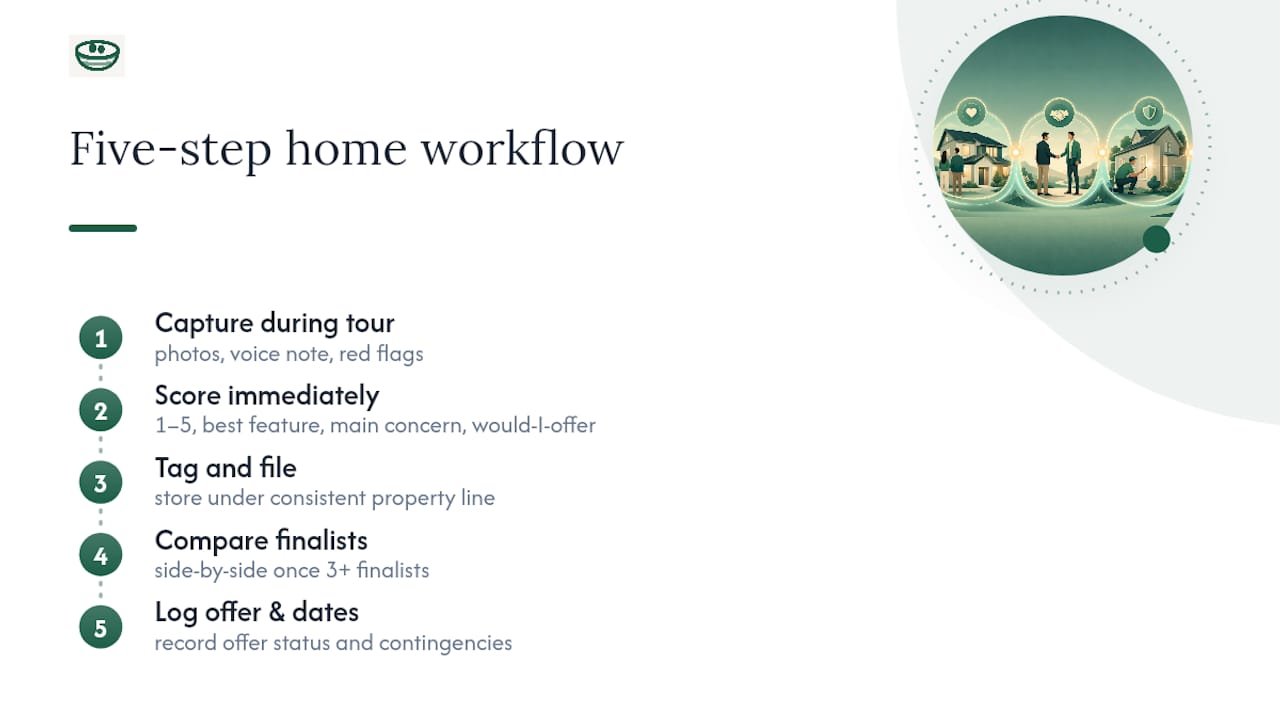
Privacy speeds this up more than people expect. When you're not editing your own thoughts for an audience, you write faster and more accurately, and accurate notes are what let you compare ten homes in the time it used to take to reconstruct one from memory.
Paste this into your workspace:
Property: [address] | Score: [1-5] | Best feature: | Main concern: | Would I offer: Y/N | Offer status: | Next deadline:
Run every home through that same line, and by the time you're choosing between finalists, the decision has already mostly made itself.
— Antony
Getting Started With NestNoted's Private Workflow
Some private property management tools implement workflows where notes are private by default, support mixed-format captures attached to property records, and use a pipeline view to track tasks, deadlines, and offers. Agent collaboration may include layered permissions to allow control over sharing.

Getting set up takes about as long as touring one house. Create a free account, set up your workspace, and paste the scoring template from this guide into your first property record. From there, every showing you complete adds a searchable, private entry instead of another blurry memory. Start your workspace at NestNoted before your next scheduled tour.
Sources
- The Ultimate Home Buying Checklist In 15 Steps | Redfin
- House Hunting Checklist: Compare Homes Better