

Prioritize home listings by running them through a private pipeline with a weighted scorecard, then narrowing your search with saved views and alerts so only real contenders reach you. A tool like NestNoted does this by keeping notes confidential, syncing listings from major portals, and logging offers in one pipeline. That matters because the median house hunt runs about 10 weeks, and a 2025 Bright MLS survey found move-in-ready condition tops most buyers' priority lists, meaning wasted tours on the wrong homes cost real time.
Start in the next 10 minutes:
- Save every listing you're seriously considering in one private place, not three text threads and a browser tab.
- Set a hard price ceiling and one non-negotiable feature filter (bedrooms, en-suite, garage) before you look at anything else.
- Give each saved listing a rough score the moment you see it. Refine later, but never skip this step.
Key Takeaways
Prioritizing home listings works best when private scoring, saved filters, and a status pipeline replace scattered notes and memory.
| Point | Details |
|---|---|
| Use a weighted scorecard | Score price fit, condition, commute, features, risk, and impression on a 0 to 100 scale. |
| Filter before you tour | Combine a hard price ceiling with one must-have feature to cut irrelevant listings early. |
| Score immediately after showings | Log impressions and photos on-site so details don't blur across multiple tours. |
| Keep notes private by default | Confidential notes produce more honest scores and stronger negotiating leverage. |
| Adopt a tool like NestNoted | It centralizes private notes, pipeline status, side-by-side compare, and offer logging in one place. |
Table of Contents
- Prioritize Home Listings With a Ready-to-Use Scoring Template
- How Do You Rank Listings During a Home Tour?
- How Do You Build a Scoring Model That Actually Reflects Your Priorities?
- Which Tool Features Actually Matter for Prioritizing Listings?
- Get a Private Pipeline Running Before Your Next Showing
- Frequently Asked Questions
- Sources
Prioritize Home Listings With a Ready-to-Use Scoring Template
A weighted scorecard turns gut feelings into numbers you can compare across dozens of listings. Six fields cover most buyers' real decision factors: price fit, condition, commute, key feature match, deal risk, and gut impression.
Weight them by what actually breaks deals. A workable starting split: price fit 30, condition 25, commute 15, features 15, risk 10, impression 5. Price and condition dominate because they're the two factors Bright MLS found buyers rank highest, and they're also the hardest to fix after closing.
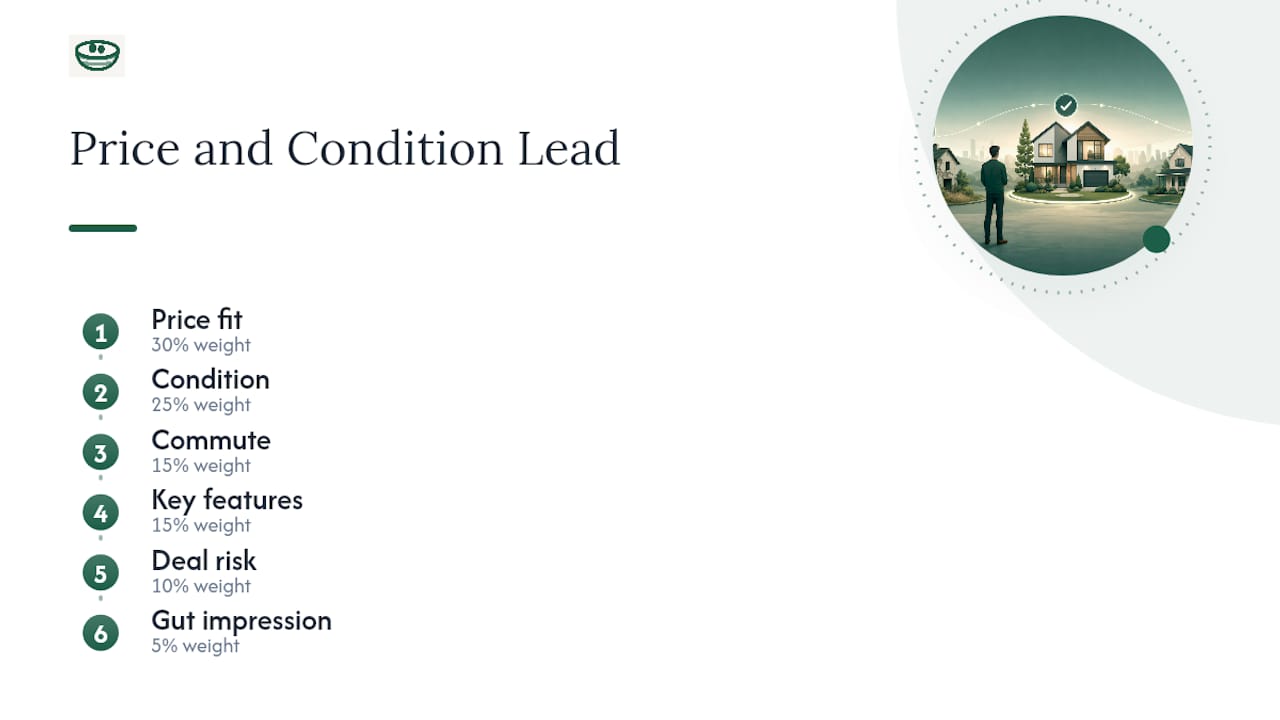
Here's the math in practice. Listing A scores 28 on price fit, 20 on condition, 12 on commute, 10 on features, 8 on risk, and 4 on impression, for a total of 82. Listing B scores 30, 15, 15, 8, 5, and 5, for a total of 78. Listing A wins on paper even though B might "feel" nicer on a first walkthrough.
Store the template somewhere private and permanent, whether that's a house hunting spreadsheet or a dedicated tool. Pull it up at every debrief and update scores while the details are still fresh.
How Do You Rank Listings During a Home Tour?
Prioritizing listings isn't a one-time task. It's a routine you repeat before, during, and after every showing.
Before the showing:
- Apply your saved view (price ceiling plus your must-have filter) and pre-screen photos and virtual tours to cut weak candidates before you drive anywhere.
- Group same-day showings by similarity so you're comparing apples to apples, not jumping between a fixer-upper and a renovated colonial.
- Confirm your property viewing checklist is loaded so you're not improvising in the driveway.
During the showing, log three quick facts and one or two photos per room that matters, assign a score using your template on the spot, and flag any deal-breaker immediately rather than trusting yourself to remember it later.
After the showing, update the listing's pipeline status (shortlist, second visit, or offer-ready), record the next step with a timestamp, and sync notes to a shared workspace if an agent is involved.
- Bring: address list, must-have filter, blank scorecard, phone charged for photos.
- Skip: relying on memory for anything you'll compare against five other houses.
Pro Tip: Show weak listings first and your strongest contender last. Buyers anchor to whatever they see most recently, so ending on your top pick makes the "yes" decision easier.
How Do You Build a Scoring Model That Actually Reflects Your Priorities?
Weights only work if they map to what genuinely breaks a deal for you, not what sounds responsible on paper. A buyer with a strict budget should weight price fit heavily. A buyer relocating for a job might weight commute higher than condition.
Normalize every field to the same 0 to 100 scale so they can be added together fairly. A price gap converts naturally: a listing $10,000 under your ceiling might score 90, while one at the ceiling scores 50. Binary features (has a garage or doesn't) convert to flat scores, like 100 or 0. Subjective impressions get scored on a simple 1 to 5 gut scale, then multiplied to fit the 100-point range.
Test the model on five to 10 recent listings before trusting it fully. If the scores keep contradicting your actual gut reaction, the weights are wrong, not your instincts. Watch for anchoring, where the first house you tour quietly becomes the benchmark every later score gets measured against.
The score should sharpen your prioritization, not replace it. A listing that scores lower but gives you a genuinely good feeling on a second visit still deserves a real conversation with your agent, not automatic disqualification.
Which Tool Features Actually Matter for Prioritizing Listings?
Not every app built for browsing listings is built for prioritizing them. The features that matter for a serious buyer look different from what a casual scroller needs:
- Private notes that stay confidential by default, so you can write "kitchen smells like a cigar bar" without worrying it becomes public.
- Side-by-side compare views for stacking two or three finalists against each other.
- A status pipeline (interested, toured, offer-ready, passed) that replaces sticky notes and group texts.
- Saved views and price-drop alerts tied to your exact filters.
- Portal sync from major sites like Zillow and Redfin, so you're not manually re-entering data.
- Photo attachments and timestamped actions, so a note from three weeks ago has context.
Privacy isn't a nice extra here. It's what lets you write an honest first impression instead of a polished one you'd be comfortable with a seller's agent reading.
Agents managing multiple clients should also look for shared private workspaces, task templates, offline access for dead zones, and exportable reports for offer packets, which a visual pipeline setup tends to standardize automatically.
Combining a price ceiling with a feature filter into one saved view puts you inside the correct slice of inventory from the first search, instead of filtering a flood of irrelevant listings one by one.
That's not a minor convenience. As Technology points out, pre-combined filters scale better the more inventory you're sorting through, which matters a lot once you're tracking 30 or 40 listings instead of five.
Collaborating With Your Agent Without Losing Privacy

Set one rule early: private impressions stay private, and only agreed recommendations move to the shared view. Give your agent read/write access to shared status and comps, but keep your candid notes in a personal layer they can't see unless you choose to share a specific one. Before writing an offer, archive a snapshot of the listing's status and notes so nothing shifts mid-negotiation. When it's time to loop in an attorney or lender, compile scores, comps, and rationale into one packet instead of forwarding scattered texts.
Mistakes That Slow Down Serious Buyers
- Tracking listings across texts, email, and a browser tab. Fix: pick one private source of truth and use it exclusively.
- Waiting to score a home until after touring 10 others. Fix: score immediately, while the impression is fresh.
- Trusting a public portal's "pending" status over your own pipeline. Fix: verify directly, don't assume.
- Skipping a hard price filter "just to see what's out there." Fix: set the ceiling before you browse.
With a median 10-week house hunt, every wasted showing eats into a tight window.
A Quick Example: Price Ceiling Plus One Must-Have
A buyer with a $450,000 ceiling who needs a primary en-suite and a commute under 35 minutes starts with 40 matching listings on a broad search. Adding the ceiling and en-suite filter as a saved view cuts that to nine. Running those nine through the scorecard surfaces one clear leader, cutting roughly two weeks of scattered touring down to a single focused weekend, and that listing moves straight to offer-ready.
Why Privacy Changes How Buyers Actually Decide
Private notes get honest notes. Buyers write what they actually think when they know a seller's agent will never see it, and that candor is what makes a scorecard trustworthy instead of diplomatic. Products like NestNoted build on that idea directly, and it's worth adopting the moment you expect more than three showings.
Get a Private Pipeline Running Before Your Next Showing
Nestnoted is the alternative to juggling spreadsheets, screenshots, and group texts across every listing you tour. It gives you one private place to track listings, write candid notes nobody else sees, compare finalists side by side, and log offers as they happen, with automatic sync from portals like Zillow and Redfin so you're not re-entering data by hand.

Getting started takes about the time of one showing. Sign up, import a saved search or add five listings you're already considering, apply the scoring template from this article, and invite your agent into a shared workspace if you're working with one. By the end of the first week, most buyers have an organized shortlist, active price alerts, and a pipeline that finally replaces the sticky notes. Set up your free account at NestNoted and start your first scorecard tonight.
Frequently Asked Questions
What does it mean to prioritize home listings? It means ranking the properties you're actively considering by a consistent set of criteria (price, condition, commute, deal-breakers) instead of relying on memory or gut feeling alone, so you know which homes deserve a second visit or an offer.
How many listings should I actively track at once? Most serious buyers manage anywhere from 10 to 40 active listings during a search. A private pipeline with status stages (interested, toured, offer-ready, passed) keeps that volume manageable without losing track of details.
Should my scoring template be the same as everyone else's? No. Start from a general template covering price fit, condition, commute, features, risk, and impression, then adjust the weights to match your own deal-breakers, whether that's school district, commute time, or move-in condition.
How do saved views and alerts help with prioritization? A saved view combining your price ceiling and a must-have feature filter keeps new listings pre-screened before you ever see them, and price-drop alerts flag when a listing that was previously out of range becomes worth a second look.
Is it worth using a dedicated tool instead of a spreadsheet? A spreadsheet works for a handful of listings, but once you're tracking dozens across multiple tours, a tool built for private notes, portal sync, and pipeline status saves real time and avoids the version-control mess of shared files.
Sources
- Why Real Estate Search Is Finally Getting More Specific, and Why That Matters - Technology Org
- Axionis
- Property Search & Showing Process: Optimizing the Path from Search to Purchase Decision