

The winning system is simple: capture a 90-second voice note before you leave the driveway, sort it into four buckets, turn that into a two-minute recap, file it in an organized vault, then push only the essentials into your CRM. Tools like NestNoted are built around this exact pattern, according to the company's own claims. Done right, this workflow gets a client-ready recap out the door quickly, often within a few minutes.
TL;DR:
- Most agents forget key client impressions during showings, risking lost deal opportunities without a structured note-taking and organization system.
- A four-bucket template captures essential details quickly onsite, including visual memory, positive reaction, hesitation, and next step, ensuring clarity and recall.
- Proper organization requires creating a top-level page per buyer and property, with consistent metadata to streamline retrieval and search long after the showings.
- Transitioning only decision-relevant fields like preferences and next actions from the notes to the CRM prevents clutter and preserves pipeline clarity.
- Timing showings and immediate note capture, rather than batch entry or delaying, significantly improves note accuracy and follow-up effectiveness.
Table of Contents
- How to Build an Agent Buyer Notes System That Works
- The Four-Bucket Template for On-Site Note Taking
- Organizing and Tagging Buyer Notes So Nothing Blurs Together
- Where Buyer Notes Fit Alongside Your CRM
- Turning Notes Into Follow-Up Emails and Offer Briefs
- AI Drafting, Verification, and Keeping Buyer Notes Private
- A Working Agent's Take on Scheduling and Common Mistakes
- How NestNoted Fits Into Your Showing Workflow
- Sources
- FAQ
How to Build an Agent Buyer Notes System That Works
Most agents lose deals not because they showed the wrong houses, but because they forgot what the client actually said about the right ones, as noted by practitioner insights. Somewhere between the third showing and the drive home, the buyer's exact words about the cracked driveway or the "maybe" on the kitchen turn into a vague memory. A working buyer agent note taking system fixes that by splitting the job into three distinct layers, each with its own timing and purpose.
The first layer is capture. This happens in the car, in the driveway, or on the sidewalk, shortly after leaving the property. It is fast, unfiltered, and voice-first because typing loses the client's actual language and tone.
The second layer is organization. This is where raw impressions get sorted into a repeatable structure, so that a note taken on Tuesday about one house doesn't blur into Thursday's note about another. This mid-layer is where most agents skip a step, and it costs them. Practitioner guidance on buyer-system workflows consistently points to treating client representation as a repeatable flow rather than a string of one-off emails, and that repeatability is what protects negotiation leverage later.
The third layer is your CRM or transaction platform, which should only ever receive the distilled, decision-relevant summary. Not the raw ramble.
A daily showing run should follow this rhythm:
- Record a voice memo shortly after each showing, before getting in the car.
- Sort that memo into the four-bucket template within the same hour.
- Send a short recap to the client by end of day, or sooner for hot listings.
- Update the CRM only after the recap is sent, using the finalized summary.
Skipping straight from memory to CRM entry is where accuracy dies. A short mid-layer between the showing and the database gives you room to think before you commit anything to a permanent record.
The Four-Bucket Template for On-Site Note Taking
Four short fields are enough to write a useful recap for almost any showing, according to field testing behind the buyer showing notes template approach. Trying to capture more than that in the field usually means capturing less, because agents abandon long checklists under time pressure.
Use these four buckets on every property, no exceptions:
- Memory anchor: one visual or physical detail that will instantly remind you (and the client) which house this was. "The kitchen with the exposed brick" beats "123 Maple Street" for actual recall.
- Strongest positive: the single thing the buyer reacted to well, in their own words if possible.
- Biggest hesitation: the concern, no matter how small it seemed in the moment. This is the detail that gets lost first if you wait to write it down.
- Next step: what happens with this property. Second showing, pass, or move toward an offer.
Here's what that looks like in practice. Single property recap: "Memory anchor: the wraparound porch. Positive: loved the natural light in the main bedroom. Hesitation: worried about the busy street noise. Next step: wants to see it again at evening rush hour before deciding." That's four sentences, and it's everything you need six weeks from now when the buyer asks, "Wait, which one had the porch?"
Multi-property comparison works the same way, just run side by side: "House A's hesitation was noise, House B's hesitation was the tiny closet. Both scored high on positive, but House A's next step is a second showing and House B is a pass."
Pro Tip: Build the habit before you build the system. Record your voice memo the moment you're back in the car, not after the next two showings. A 90-second habit repeated five times a day beats a perfect template used once a week.
Organizing and Tagging Buyer Notes So Nothing Blurs Together
Real estate buyer notes fall apart at scale for one reason: no structure to hold them. An agent showing four buyers a dozen houses each is sitting on roughly fifty sets of impressions within a month, and without organization, they're indistinguishable.
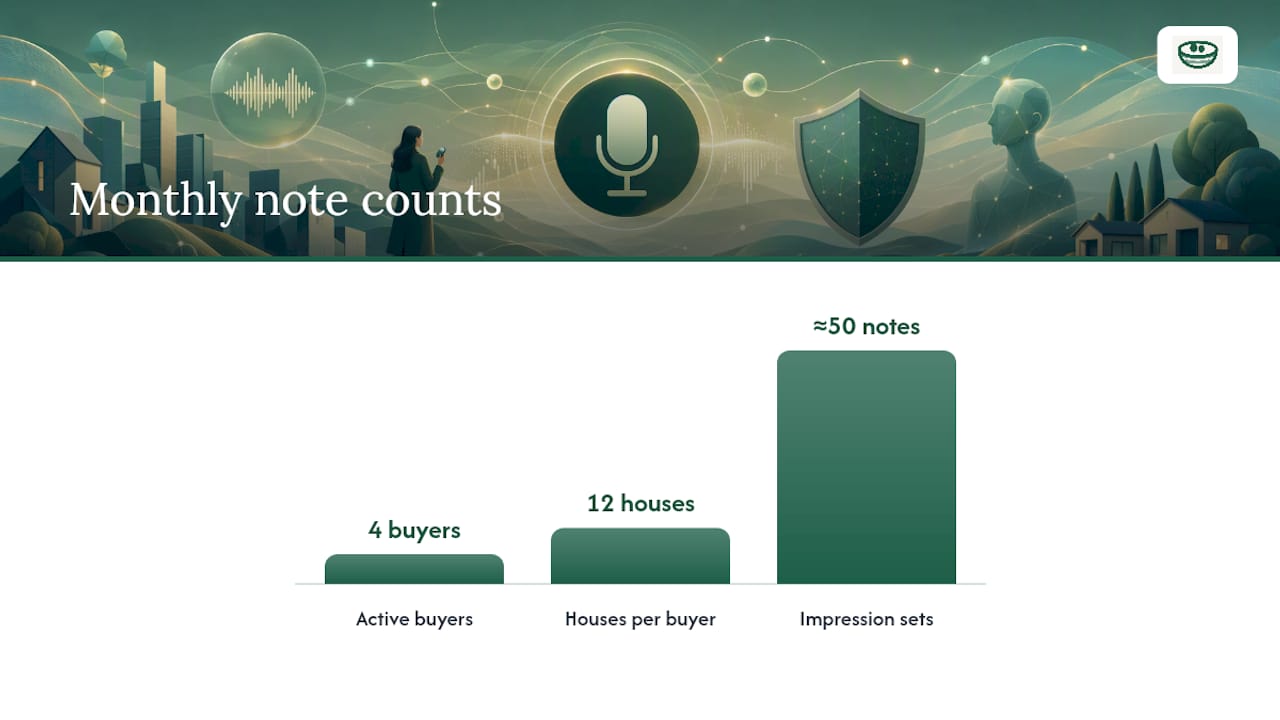
The fix is a two-level page structure. Create one top-level page per active buyer, and one top-level page per active property, each with dated sub-pages underneath for individual showings. This vault pattern, described in guidance on structuring AI-assisted real estate notes, lets you pull up either "everything this buyer has seen" or "everyone who's toured this property" in seconds.
Every note needs a small set of consistent fields attached, or retrieval breaks down the moment you have more than a handful of showings logged:
- Property address and MLS number
- Buyer name (or household name for couples)
- Emotion tag: love it, maybe, pass
- Decision signal: ready to offer, wants second look, eliminated
- Follow-up task with a date attached
Consistent metadata like this is what makes a note findable six weeks later instead of buried in a scroll of text messages, a point backed by Evernote's guide for real estate agents on structured note habits. A property tagging system built around a handful of fixed tags, rather than free-form comments, is what lets you search "pass" across every buyer and instantly see which houses are dead versus which ones deserve a second look. When a buyer calls asking to compare three homes they saw a month apart, you should be able to answer in under thirty seconds, not by scrolling through old texts.
Where Buyer Notes Fit Alongside Your CRM
Your capture vault and your CRM serve two different jobs, and mixing them up is what makes both worse. The vault holds the messy, honest, in-the-moment reactions. The CRM holds the clean, permanent record your brokerage and transaction coordinator actually need.
Here's the rule of thumb for what crosses over and when:
- Push a summary to the CRM only after a showing recap has been sent to the client, never before.
- Transfer three fields, and only three: final preference, offer history, and next action. Leave the rest in the vault.
- If a note is purely emotional or speculative ("liked it but wasn't sure why"), it stays in the vault. If it's decision-relevant ("wants to offer $410,000 contingent on inspection"), it moves to the CRM.
This division matters more than it sounds. CRMs get messy fast when every field comment lands directly in the comments section, turning a pipeline view into a wall of text nobody rereads. A short mid-layer between the showing and the CRM helps prevent that noise and keeps the pipeline more usable for tracking where each buyer stands.
The payoff shows up at offer time. When a buyer says "let's write on the Elm Street house," you shouldn't be digging through three weeks of texts to remember what they liked about it. You should already know, because it's sitting in a property pipeline built for exactly this handoff. A realtor collaboration workflow that separates capture from CRM entry also makes it easier to loop in a co-agent or transaction coordinator without dumping your raw field notes on them.
Turning Notes Into Follow-Up Emails and Offer Briefs
A follow-up email built from your four-bucket notes typically includes four parts: a warm opening line referencing something specific from the showing, a short property summary, a list of items that still need follow-up, and one clear next step. Skip the filler. Buyers remember agents who write like they were actually paying attention in the room.
The same four-bucket notes become the backbone of an offer-prep brief. Pull the positives to justify the price, pull the hesitations to anticipate what the buyer will want addressed in negotiation, and pull the next-step field to confirm everyone's on the same page before you draft numbers.
If you're using AI to draft either document, the prompt structure matters as much as the notes themselves. A workable prompt looks something like: "Using these four-bucket notes, draft a client recap email. Mark any detail you're not fully certain about with [VERIFY] instead of guessing." That single instruction, laid out in the 4-minute AI workflow practitioners use for buyer recaps, is what keeps AI from quietly inventing a detail you never actually observed.
Before sending anything AI-assisted, run this checklist:
- Does every [VERIFY] flag have an answer, or does it need a call to the client first?
- Does the recap match your original voice memo, not a smoothed-over version of it?
- Is the next step specific enough that the client knows exactly what happens next?
- If a repair or condition issue came up, does it point to an inspector or contractor rather than asserting a fact you didn't confirm yourself?
Pro Tip: If a showing surfaced a real repair concern, like foundation cracks or an aging roof, flag it as "needs verification" and point the client toward a licensed contracting service rather than guessing at severity yourself. Your job is to notice it, not diagnose it.
AI Drafting, Verification, and Keeping Buyer Notes Private
AI can turn a rough voice memo into a polished recap in under a minute, but it can also invent details that were never actually said. That risk is exactly why practitioner guidance on AI-assisted real estate workflows insists on one hard rule: instruct the AI to flag anything unclear rather than fill the gap on its own.
Never let AI assert a property condition or client preference it can't trace back to your actual notes. If a detail is missing, the correct output is a flag for human follow-up, not a confident guess dressed up as fact.
That single instruction is the difference between a tool that saves you time and one that quietly puts words in your client's mouth. Label anything AI-drafted as a draft until a human has read it, and never send an AI-generated recap without checking it against your original voice memo first.
Privacy deserves the same discipline. Buyer notes often contain candid, sometimes unflattering opinions about a property, a neighbor, or a price point, and those opinions need to stay confidential by default. Notes should only be visible to the buyer and the agent working the deal, not exposed the way a public review platform would expose them. According to NestNoted's own description of its platform, notes and ratings stay private by default, with dedicated property pages and side-by-side comparison views built specifically for buyers and agents working through multiple showings together. That structure only works if privacy is the default setting, not an option a busy agent has to remember to turn on.

A Working Agent's Take on Scheduling and Common Mistakes
The agents who get this right block ten minutes of buffer time after every showing, before the next one starts. Not for a break. For the voice memo. Skip that buffer once and the details from house two start bleeding into house three, and by house five you're reconstructing memories instead of recording them.
The most common mistake I see isn't a bad template. It's timing. Agents wait until they're back at the office, batch four showings' worth of notes at once, and end up with generic impressions instead of the sharp, specific details that actually help a buyer decide. The second most common mistake is letting raw field comments flow straight into the CRM, which turns a clean pipeline into a scroll of half-formed thoughts nobody rereads.
Fix the timing, and the rest of the system tends to fix itself.
— Antony
How NestNoted Fits Into Your Showing Workflow
NestNoted gives buyer agents a private layer for exactly this workflow, without asking you to bolt another app onto your CRM. According to the company's own description, notes and ratings stay confidential by default, listings sync in from major sites like Zillow and Redfin, and buyers and agents can work inside shared workspaces with side-by-side property comparisons.

Picture the flow: you record a voice memo in the driveway, sort it into your four buckets inside a dedicated property page, and by the time you're back at your desk, you already have a comparison view ready to turn into an offer-prep brief. That's the post-showing recap becoming the offer brief without a single extra step of re-typing notes into a different system. If you're managing multiple buyers and dozens of showings, a private home buying workflow built for this exact handoff is worth trying before your next full day of showings. Set up your workspace at NestNoted and run your next showing through it before you go back to scattered texts and spreadsheets.
Sources
- A 4-Minute AI Workflow Every Buyer Agent Should Have
- AI notes real estate — docapybara guide
- Buyer-system guidance — Debby Eubank
- Note-Taking for Real Estate Agents: A Practical Guide — Evernote
FAQ
What CRM or software does Keller Williams use?
Keller Williams agents typically use the brokerage's proprietary Command platform for CRM and transaction management, though many agents layer in separate note-taking tools for field capture. A dedicated capture layer, like the vault pattern described in this guide, is usually kept separate from whatever CRM a brokerage assigns.
How much would a real estate agent make on a $300,000 house?
Commission splits vary by brokerage and market, but a common structure is a total commission split between buyer and listing agents, then divided again with the agent's brokerage. Because rates and splits vary widely by state and firm, agents should check their own brokerage agreement rather than assume a fixed percentage.
What is the 3-3-3 rule in real estate?
Definitions of the 3-3-3 rule vary by market and source, and no single canonical version applies everywhere. Agents should confirm the specific meaning used in their own brokerage or market before applying it to client conversations.
Can a seller refuse to pay a buyer's agent?
Yes, sellers can refuse to offer buyer-agent compensation, and commission structures have shifted significantly following recent industry rule changes. Buyer agents increasingly need clear written agreements with clients up front, which makes documented, organized buyer information tracking even more important for justifying value throughout the search.
Do I need special software for an agent buyer notes system?
Not necessarily, but a dedicated tool makes the four-bucket workflow far easier to sustain across dozens of showings. Some dedicated tools offer private, purpose-built options for this workflow, though pricing details should be checked on their official websites.