

AI for home buying, in the sense that matters once you've toured your fifth open house, means an AI-enhanced private property-management tool that tracks listings, records your impressions, and lets you ask plain-language questions about your own notes. Tools like NestNoted apply this approach to keep comparisons consistent instead of scattered across texts and spreadsheets, and a weighted-score method is what turns those private notes into a real decision.
TL;DR:
- AI tools rely on user-generated data like photos, notes, and behavioral signals, which reveal preferences that are hard to articulate.
- Building habits like recording key impressions and flagging concerns during tours improves AI summaries and comparison accuracy.
- Using weighted scores based on personal priorities ensures objective evaluation, with AI filling in objective data from synced listings.
- Privacy should default to data protection, with encrypted storage, granular sharing, and verification of auto-filled financial details.
- AI tools enhance organization and collaboration but depend on detailed, honest input to avoid superficial or inaccurate summaries.
Table of Contents
- How Does AI for Home Buying Actually Work?
- What Are the Best Workflows for Touring and Comparing Homes?
- How Do You Score and Compare Homes Objectively?
- How Does Privacy Work in AI Home Buying Tools?
- What Are the Limits of AI Tools in Home Buying?
- How Do AI Real Estate Tools Compare on Features?
- How Do You Customize AI to Fit Your Priorities?
- How Should Buyers and Agents Share AI-Organized Notes?
- Why Structured Notes Change How Buyers Decide
- Start Using NestNoted for Your Home Search
- Sources
How Does AI for Home Buying Actually Work?
Forget the version of "AI real estate" that promises to find you a house or haggle with a seller. That's a different product solving a different problem. The AI covered here works on the data you generate: what you write down, what you photograph, and how you behave during a tour.
The inputs are simple and mostly things you already produce:
- Photos and voice notes taken room by room during a showing
- Written impressions, ratings, and pros/cons you log right after
- Listing metadata synced from sources like Zillow and Redfin
- Behavioral signals from virtual tours: which rooms you lingered in, what questions you asked
That last input is more valuable than most buyers realize. Interactive virtual tours capture behavioral signals like time spent per room and specific questions asked, and that data reveals priorities buyers often can't articulate themselves. If you spent four minutes in a kitchen and thirty seconds in a primary bedroom, that pattern says something a star rating never will.
Once the data exists, the AI's job is narrow: auto-tag entries by feature (natural light, storage, layout flow), summarize a dozen scattered notes into one paragraph, and answer direct questions about what you've already recorded. Ask "which houses had foundation concerns?" and it should surface every relevant note in seconds, not make you scroll through six weeks of texts.
Pro Tip: Try a query like "show me every home under $650,000 with a finished basement and no HOA" right after a tour. If the tool can't answer that from your own notes, it's a database, not an assistant.
What Are the Best Workflows for Touring and Comparing Homes?
Good outputs depend on good inputs, and good inputs depend on habits you build before you ever walk through a door.
On tour day, capture five things for every property, even the ones you're sure you'll forget: asking price versus your target, one photo per room with a voice note attached, your gut reaction in a single sentence, any red flag (smell, noise, deferred maintenance), and the listing agent's contact. Buyers who skip the gut-reaction line regret it most. Two weeks and eleven houses later, "nice light in the kitchen" is worth more than you'd think.
After the tour, let the AI do the tedious part. It should generate a pro/con summary from your raw notes, flag anything you tagged as a concern for follow-up, and queue a question for your agent automatically. Pre-qualifying interest before a second visit matters here too. Engagement signals from earlier tours help focus follow-up visits on homes worth a second trip, instead of burning a Saturday on a property you were never serious about.

For comparisons, run a weighted score across every home you're actively considering, not just the two you like best. Reconcile the AI's summary against your own memory. If the summary says "spacious closets" and you don't remember any closets, that's a data problem, not a memory problem.
For agent collaboration, share the essentials, meaning price feedback, timeline, and deal breakers, while keeping the unfiltered notes private. An agent doesn't need to see "the seller's taste in wallpaper made me question everything," but they absolutely need to see "over budget by $20,000, walk away if it doesn't come down."
- Capture five fields per property during the tour
- Let AI generate the pro/con summary same day
- Flag red flags for follow-up within 48 hours
- Run the weighted score before comparing more than three homes
- Share a curated summary with your agent, not the raw notes
How Do You Score and Compare Homes Objectively?
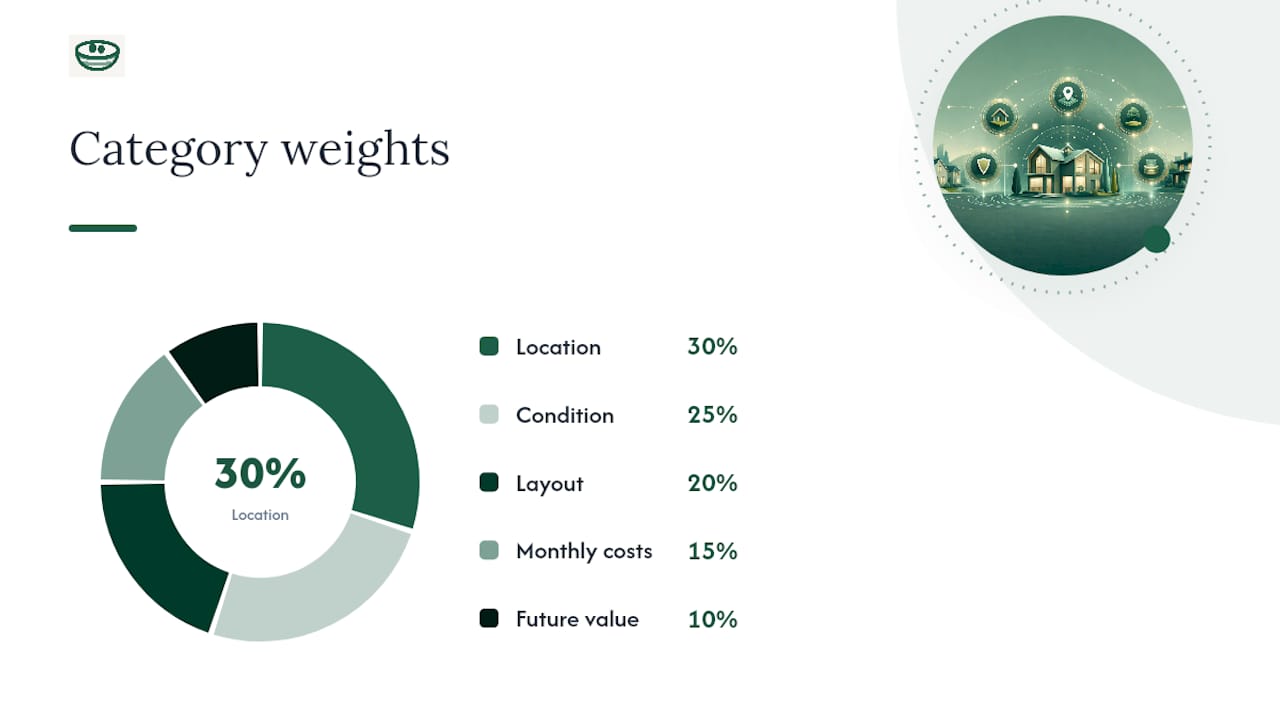
A weighted score sheet beats gut instinct because it forces you to weigh categories before you fall in love with crown molding. The categories that matter most for most buyers: location, condition, layout, monthly costs, and resale or future value. You assign each a weight (say, location at 30%, condition at 25%, layout at 20%, costs at 15%, future value at 10%) based on what actually matters to you, then score each home 1 to 10 in every category.
AI earns its place in this process two ways. It fills the objective fields automatically, pulling tax history, HOA fees, and square footage straight from synced listing data. And it extracts the subjective signal from your tour behavior and notes, turning "I kept walking back to the kitchen" into a higher layout score than you might have consciously assigned.
Here's how it plays out with two homes:
- Home A: Location 9, condition 6, layout 8, costs 7, future value 6. Weighted total: roughly 7.4.
- Home B: Location 6, condition 9, layout 6, costs 8, future value 8. Weighted total: roughly 7.0.
That's the point. The math should reflect your priorities, not a generic template, so revisit your weights after the first three or four tours once you know what you actually care about.
How Does Privacy Work in AI Home Buying Tools?
Privacy-by-default should mean your notes are visible to no one unless you choose to share them, not that privacy is a toggle buried three menus deep.
Look for a few concrete things before trusting a tool with your candid impressions:
- Notes stored privately by default, not public or agent-visible unless you opt in
- Encryption for stored data and export controls you actually control
- Granular sharing (a single note, a single property) rather than all-or-nothing access
Data provenance matters just as much as privacy settings. Synced listing metadata goes stale, tax records get mismatched to the wrong parcel, and HOA fees quoted online often lag real numbers by months. Build a habit of cross-checking auto-filled financial fields against county assessor records and the HOA directly before you let a number influence your offer.
Over-reliance is the real risk. Treat AI summaries as a first draft of your own memory, not a replacement for it, and reread your original notes on any home before you make an offer.
What Are the Limits of AI Tools in Home Buying?
AI-organized notes are only as good as what you feed them, and that's the honest limitation nobody puts in the marketing copy.
A tool can summarize your impressions, but it can't smell mildew or feel a sloped floor. If your tour-day notes are thin, the summary will be thin, confidently so, which is worse than no summary at all. Watch for AI-generated pro/con lists that sound authoritative but are actually just restating a vague note in more words.
Synced data carries its own limitations too. Listing platforms update on their own schedules, and a price drop or pending sale can lag by a day or more. Treat any synced field as a starting point for verification, not a final answer, especially anything tied to money: taxes, HOA dues, or square footage that seems off from what you saw in person.
There's also a comparison trap. Weighted scoring reduces bias, but a poorly calibrated weight (say, location dominating everything else) can make the math validate a decision you'd already made emotionally. Recalibrate honestly, not to justify the house you already want.
None of this means the tools aren't worth using. It means they work best as a structured extension of your own judgment, not a substitute for walking the property twice.
How Do AI Real Estate Tools Compare on Features?
The market for artificial intelligence in real estate splits into two lanes that get confused constantly: tools that help you find and negotiate for a home, and tools that help you organize what you've already seen. This article is about the second lane, and within it, the features worth comparing are narrower than most buyers expect.
The features that separate a genuinely useful private property-management tool from a glorified note app: sync with major listing platforms so you're not manually re-entering data, natural-language query so you can ask questions instead of scrolling, side-by-side comparison views, and offer/status tracking that follows a property from first tour to closing (or to the pass pile).
Auto-tagging and summarization quality vary widely. Some tools tag by keyword only, missing nuance; better ones cluster related notes (all your "storage concerns" across twelve homes, for instance) so patterns emerge across your entire search, not just within one listing. That pattern recognition across your whole pipeline, not any single feature, is usually the difference that matters most once you've toured more than ten homes.
Pricing models matter less than most comparison articles suggest, since the strongest option in this category currently operates as a free tool with full functionality, with premium tiers reserved for future features rather than gating what you need today.
How Do You Customize AI to Fit Your Priorities?
Default settings assume an average buyer, and you aren't one. Every serious buyer weighs commute time, school boundaries, or renovation appetite differently, and a tool that doesn't let you adjust for that will eventually feel generic.
Start by adjusting your weighted-score categories in the first week of searching, not after you've toured twenty homes. If natural light matters more to you than square footage, your weights should reflect that from tour three onward, not retroactively.
Customize your tagging vocabulary too. Generic tags like "kitchen" and "yard" are fine as a baseline, but the tags that actually help you compare are personal: "needs a home office," "walkable to train," "dog yard." A property tagging system built around your own vocabulary, rather than a generic checklist, is what makes a natural-language query useful six weeks in when you've forgotten which house had the weird laundry setup.
If you're buying with a partner, customize for two sets of priorities simultaneously. Tag notes by whose priority they address, so a shared score doesn't quietly average out one person's deal breaker. And revisit your weights every five to seven tours. Priorities shift once you've seen enough real houses to know what you actually can't live without, versus what you thought you cared about from browsing listings online.
How Should Buyers and Agents Share AI-Organized Notes?
The friction point in most buyer-agent relationships isn't communication frequency, it's communication format. Agents get a flood of texted impressions with no structure, and buyers get frustrated when their agent misses a detail buried in message forty-seven from three weeks ago.
Structured sharing fixes this without asking either side to change how they naturally work. Share a curated export, meaning the pro/con summary and your weighted scores, rather than your full raw notes. Your agent gets what they need to negotiate and schedule; you keep the unfiltered "this house gave me a weird feeling" entries private.
Set a rhythm early: a summary export after every tour, a comparison view shared before every offer discussion. That routine reduces wasted tour time because your agent walks into every conversation already knowing which properties are live contenders and which have been mentally crossed off.
For agents managing multiple buyers, this same structure scales. A dashboard view of each client's live properties, tagged by status, replaces the mental math of remembering which of your fifteen active buyers liked which of sixty toured homes. Behavioral data from tours, captured through virtual tour engagement or logged manually, gives agents a second data point beyond what a buyer says out loud, which often diverges from what they actually responded to on-site.
Why Structured Notes Change How Buyers Decide
Every buyer who's toured more than fifteen homes hits the same wall: the houses blur together, and the details that mattered get replaced by vague impressions. I've seen the pattern play out the same way across enough buyer conversations to trust it. The buyer who kept structured notes remembers, three weeks later, exactly why they passed on the house with the beautiful kitchen. The one relying on memory and a few texts usually can't, and ends up second-guessing a decision they made for good reasons.
The mistakes are consistent: skipping the "gut reaction" note because it feels unnecessary in the moment, letting an agent's enthusiasm overwrite a private red flag, and comparing homes from memory instead of a weighted sheet once more than three are in play. Structured, private notes fix all three, not because the AI is smart, but because it makes you consistent when your memory won't be.
— Antony
Start Using NestNoted for Your Home Search
Nestnoted is the alternative to a spreadsheet you'll abandon by house number seven. Every workflow covered here, tour-day capture, AI-generated summaries, weighted comparisons, and offer tracking, exists inside one private system that syncs with Zillow and Redfin so you're not retyping listing details by hand.

Getting started takes about ten minutes: create a free account, import your first few properties from a synced listing platform or the home search dashboard, and log your notes from your next tour the same day you take them. Run your first natural-language query once you've got three or four homes logged, something like "which houses had storage concerns," and you'll see immediately whether your notes are detailed enough to be useful. Every note stays private by default, visible only to you and anyone you explicitly invite in. Start your free account at NestNoted before your next tour, not after your twentieth.
Sources
- Silent Buyers: The Data Gap Hiding Inside Every Virtual Tour | Inman Real Estate News
- How to Compare Two Homes: Guide for Smart Homebuyers
- Home tour to qualify leads is wasting your week | Rextheme