

Use instant alerts for your must-see listings, hourly or 15-minute checks for close matches, and a daily digest for everything else. That tiered pattern protects you during the first 48 hours after a price cut, when serious offers get made, without burying you in noise from listings you don't care about yet. Nestnoted's private tracker is built around exactly this kind of layered setup.
TL;DR:
- Instant alerts are recommended only for homes you have already toured or flagged as high priority, as delays can extend beyond a few minutes depending on connection quality.
- Fifteen-minute alert delays remain acceptable for most buyer monitoring tools, but delays over 30 minutes on priority listings indicate the need to switch systems or adjust settings.
- Polling every five minutes increases system load significantly and makes sense only for fast-moving markets or very small, critical watchlists.
- Using minimum thresholds of 2-3% of listing price for alerts prevents noise from minor price adjustments and reduces alert fatigue.
- Nestnoted offers private, tiered alert setups that keep your watchlist confidential and allow customization based on listing importance and engagement signals.
Table of Contents
- How Does Price Alert Frequency Actually Work?
- Which Alert Frequency Fits Your Buyer Profile?
- How Do You Test and Benchmark Alert Delay?
- How Do You Prevent Alert Fatigue Without Missing Deals?
- Why Nestnoted Fits This Alert Strategy
- Detection Lag: What Actually Happens Between MLS and Your Phone
- What Serious Buyers Get Wrong About Alert Speed
- Try Nestnoted: Set Up Tiered, Private Alerts
- Selected Practical Resources and Internal How-Tos
- Sources
- FAQ
How Does Price Alert Frequency Actually Work?
"Instant" doesn't mean instant. It means the gap between an MLS update and a notification landing on your phone, and that gap depends entirely on how the alert system connects to the data.
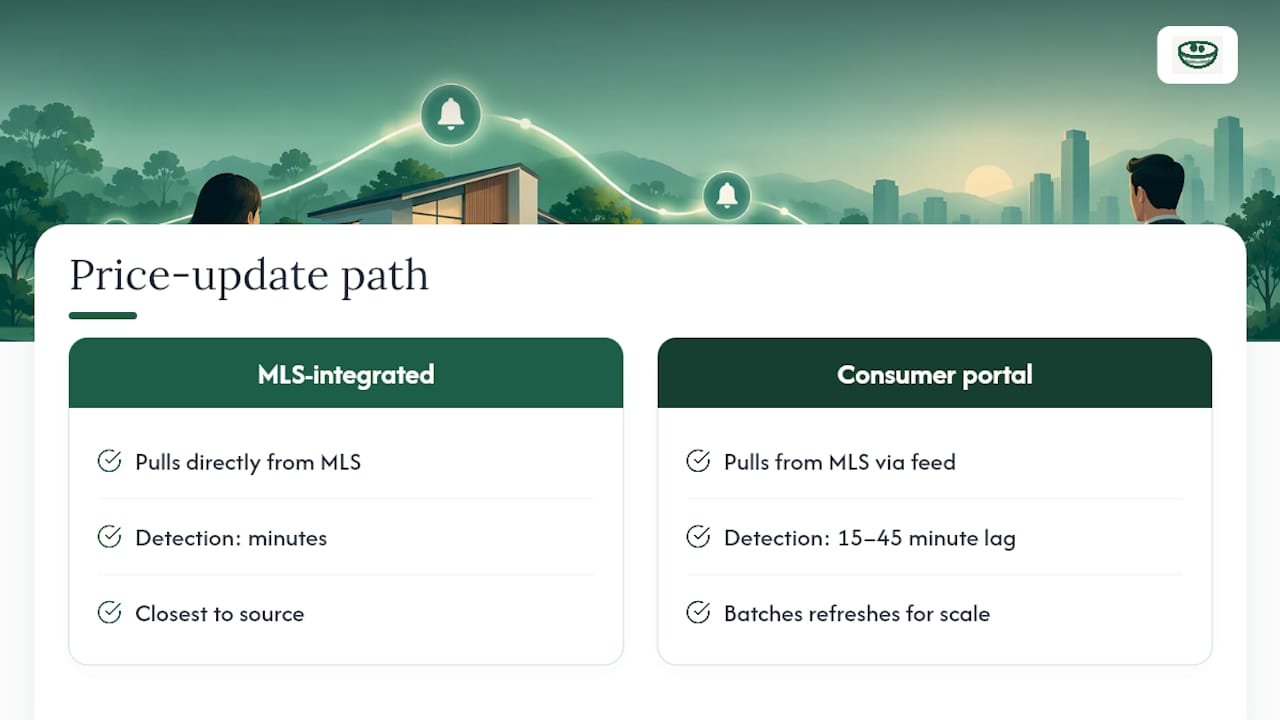
Systems with a direct MLS feed can detect a price change within minutes. Consumer portals like the big listing sites typically show that same change 15 to 45 minutes after the MLS propagates it, sometimes longer during high-traffic periods. That lag is the entire reason "beating Zillow" is a real, measurable goal rather than a marketing line.
Each frequency setting carries its own trade-off between speed and cost:
- Instant/push: Near real-time delivery, best for a handful of top-priority listings. Draws on more system resources per listing, so it should stay reserved for homes you'd act on same-day.
- 15-minute polling: Treated as the practical "real-time" standard in most buyer-facing monitoring tools, fast enough to beat portal notifications on most days.
- Hourly: A sensible default for warm listings you're still evaluating. Slower, but it won't drain attention or battery life.
- Daily digest: Right for broad scouting across a city or price range, where you want awareness, not urgency.
The infrastructure math matters here too. Polling every five minutes generates dramatically more requests than polling hourly, and that cost only pays off when a market is moving fast enough to justify it, per the same polling analysis. For most buyers, that means reserving the tightest settings for the smallest, most important list.
Which Alert Frequency Fits Your Buyer Profile?
Not every listing deserves the same urgency, and not every buyer is at the same stage. Match the cadence to where the listing sits in your process, not to a blanket setting applied to everything you're tracking.
- Active buyers with toured "must-see" homes should run instant push alerts on anything they've already walked through or flagged as a top contender. These are the listings where a price drop changes your offer strategy immediately.
- Warm buyers evaluating a short list do well on 15-minute or hourly checks. You're not ready to act in minutes, but you don't want to find out about a cut two days late either.
- Passive buyers still scouting a market should sit on a daily digest. You want the pattern, not the ping.
- Agents managing a client roster need per-client tiers, since a listing that's urgent for one buyer might be background noise for another.
Watch engagement, not just intent, to know when to move someone up a tier. A buyer who opens every alert and clicks through within an hour is signaling their ready for tighter monitoring. One who lets digests pile up unread has told you, whether they meant to or not, that daily is plenty.
Pro Tip: Re-tour interest is the strongest signal you'll get. If a buyer asks to see a home a second time, move it into the instant tier that same day, before the price even moves.
How Do You Test and Benchmark Alert Delay?
Run a controlled test before trusting any system with your priority list. Make a small, reversible price edit on a test listing or feed, then time each stage independently.
- Mark the timestamp of the MLS update itself.
- Mark when your platform detects the change.
- Mark when the notification actually lands in your inbox or on your phone.
Isolating each stage tells you where delay actually happens, whether it's the feed, the processing layer, or delivery. Once alerts are running for real, track median delivery time against a 15-minute benchmark, since that's the threshold most buyer-alert systems treat as effectively real-time performance.
Two other numbers matter as much as speed: open rate and click rate on price-reduction alerts specifically. A dropping open rate on that alert type, distinct from your general engagement, usually signals fatigue or mismatched filters, not indifference to price drops themselves. If median delay creeps past 30 minutes, or engagement stalls for two weeks straight, that's your cue to tighten filters or re-tier the listing.
How Do You Prevent Alert Fatigue Without Missing Deals?
The fastest way to make alerts useless is to let too many of them arrive. A tiered system only works if the filters behind it are doing real work, not just splitting listings into buckets that all still buzz your phone constantly.
Set a minimum threshold before anything fires. A flat percentage, something like 2 to 3% of list price, catches meaningful cuts while ignoring rounding-error adjustments agents make constantly.
- Neighborhood-level searches beat city-wide ones for volume control. A citywide feed on a major metro can produce dozens of daily hits; a three-neighborhood search produces a handful.
- Mandatory features as hard filters, not soft preferences, cut noise before it ever reaches you. Bedroom count and lot size matter more here than school district or view.
- Lower thresholds only for flagged listings. A home you've already toured deserves to alert on smaller moves than one you've only seen in a search feed, since smaller price signals still matter once you're emotionally invested.
- Mute rules for stale searches. If you haven't opened a digest in three weeks, that search has told you something. Pause it rather than let it keep firing.
Why Nestnoted Fits This Alert Strategy
Nestnoted was built around the idea that your notes and your watchlist stay private by default, which matters as much for alert strategy as it does for offer notes. You can run a tight instant tier on toured favorites and a wider digest on scouting searches inside one account, without any of it becoming visible to other buyers, agents, or the listing side.
Setup takes a few minutes. Nestnoted's guide on price drop alerts walks through configuring near-instant notifications versus daily summaries, and the piece on tracking MLS numbers privately covers linking specific listings to a watchlist so agents and buyers see the same data without a shared public feed.
Detection Lag: What Actually Happens Between MLS and Your Phone
A price change doesn't travel instantly, and understanding the path it takes explains most of the frustration buyers feel with public portal alerts. The listing agent updates the price in the MLS. That update then has to propagate to any system pulling from the feed, whether that's a portal, a brokerage site, or a private tracker.
Direct MLS-integrated platforms sit closest to the source, so their detection window runs minutes rather than tens of minutes. Consumer portals sit a layer further out, and that extra hop is where most of the 15 to 45 minute lag comes from. It's not laziness on the portal's part. It's a batching and refresh cycle built for scale across millions of listings, not speed on any one of them.
For a buyer watching three homes, that lag barely registers. For an agent watching sixty listings across a dozen active clients, manual checking simply breaks down at that volume, which is the entire case for automated, tiered alerts in the first place. The goal isn't shaving off every last minute. It's making sure your fastest tier is fast enough that you're not the last person to know about a price cut on a home you actually want.
What Serious Buyers Get Wrong About Alert Speed
Most advice on this topic treats speed as the only variable that matters, and that's backwards. Speed without filtering just moves the fatigue problem earlier in the funnel. A buyer who sets everything to instant will silence notifications within two weeks, which defeats the entire point of tracking listings in the first place.
The conventional wisdom also underrates how much behavior should drive segmentation. Most guides treat buyer tiers as something you set once at the start of a search. In practice, the strongest signal is what a buyer actually does with alerts they've already received. A two-track system built around priority and digest tiers only works if you're willing to move listings between tiers as engagement changes, not just at setup.
If there's one thing to prioritize first, it's this: get the instant tier small and correct before worrying about polling speed on everything else. A perfectly fast alert on the wrong listing is still noise. A slightly slower alert on the right one still lands inside the window that matters.
— Antony
Try Nestnoted: Set Up Tiered, Private Alerts
Nestnoted gives you what a public portal alert never will: a watchlist nobody else can see, where your instant tier and your digest tier both stay entirely between you and the agents you choose to share with. There's no ad-supported feed deciding which listings get promoted to your attention.

Setting it up takes about the time it takes to read this sentence twice. Create a free account, add your toured and must-see homes to the priority tier, and drop your broader search into a daily digest. Nestnoted's guide to building a home search dashboard walks through the two-tier setup step by step, and if you're weighing how to prioritize which homes go where, the staged decision-making approach in this buyer workflow guide is worth a look too. Head to Nestnoted to get your watchlist running before the next price cut hits.
Selected Practical Resources and Internal How-Tos
For setup, see Nestnoted's guides on price drop alerts and tracking listing status changes. For the technical side of polling versus real-time architecture, the monitoring API comparison breaks down cost and speed trade-offs in detail.
Sources
FAQ
When Should I Use Instant Alerts Instead Of A Digest?
Use instant alerts only for listings you've toured or flagged as a top choice, where a price move could change your offer that same day. Everything still in the scouting phase belongs on a daily digest, since instant delivery on dozens of listings quickly turns into noise you start ignoring.
How Do I Avoid Alert Fatigue Without Missing A Good Price Drop?
Set a minimum threshold, generally 2 to 3% of list price, so tiny adjustments don't trigger a notification. Pair that with neighborhood-level searches instead of citywide ones, and mute any saved search you haven't opened in a few weeks.
What Delay Is Acceptable Between A Price Change And My Alert?
Fifteen minutes is a reasonable target, since that's the benchmark most buyer-alert systems treat as effectively real-time. Anything consistently over 30 minutes on your priority tier is worth investigating or switching platforms over.
How Do I Know When To Move A Listing Into A Faster Tier?
Watch behavior, not intent. If you open a listing's alerts within an hour and click through consistently, or ask to re-tour it, that's your signal to move it into the instant tier immediately.
Does Nestnoted Support Different Alert Frequencies For Different Listings?
Yes. Nestnoted lets you run a private, tiered watchlist, instant alerts on priority homes and a broader digest for everything else, all kept confidential by default between you and anyone you choose to share it with, like your agent. Pricing details are available on the Nestnoted site.