
Centralizing home listings means keeping every property you've toured, its photos, your candid notes, and your offer history in one private dashboard instead of scattered across texts, screenshots, and browser tabs. The fastest way to build one: create a private workspace today and import or manually add your current active listings before your next tour. Everything else, scoring, offer tracking, closing checklists, gets layered on from there.
TL;DR:
- Centralizing home listings helps prevent decision fatigue by keeping photos, notes, and data linked to each property, making comparisons consistent over weeks.
- A private workspace should include listing imports, private note fields, custom scoring, side-by-side comparison tools, offer tracking, and secure data sharing options.
- Limiting house tours to three or four per day and scoring properties within an hour maintains note accuracy and prevents memory conflicts.
- Tracking offer details such as prices, contingencies, and deadlines chronologically reduces errors and supports transparent negotiation management.
- Maintaining strict privacy by using private fields and secure communication methods protects sensitive data and fosters trust with agents.
Table of Contents
- Why Centralizing Home Listings Helps Serious Buyers
- What Your Private Centralized Workspace Needs
- How to Set Up Your Centralized Workspace
- An Efficient Tour Routine That Keeps Notes Comparable
- Tracking Offers and Negotiation Data Without Losing Your Nerve
- Privacy Rules Every Serious Buyer Should Follow
- How Nestnoted Puts This Checklist Into Practice
- Author Perspective: The Habits That Actually Make This Work
- Try Nestnoted's Private Workspace for Your Next Home Search
- Sources
- FAQ
Why Centralizing Home Listings Helps Serious Buyers
Touring eight or nine houses in a month sounds manageable until you try to remember which one had the cracked foundation and which one had the weird kitchen layout. By house number five, they blur together. That's decision fatigue, and it's the main reason organized buyers outperform disorganized ones, not because they're smarter, but because they're not relying on memory alone.
A centralized system fixes three specific problems at once:
- It keeps photos and notes tied to the exact property, so you're never scrolling through a camera roll trying to guess which staircase belongs to which listing.
- It preserves comparable data across weeks of touring, so a house you saw in week one gets judged by the same criteria as one you saw in week four.
- It speeds up offer decisions because you're not reconstructing your impressions from memory when a seller gives you 48 hours to respond.
The demand for this kind of structure isn't anecdotal. A housing industry survey found that 70% of buyers describe the transaction process itself as a hassle, and many specifically want their agents coordinating mortgage, title, and insurance through integrated systems rather than juggling separate threads. Buyers aren't just tolerating fragmented tools. They're actively frustrated by them.
What Your Private Centralized Workspace Needs
Not every note-taking app or spreadsheet qualifies as a real centralization tool. Before you commit to a system, whether you build your own or use a dedicated platform, check it against this list.
- Listing aggregation and import: the ability to pull in listings from sites like Zillow and Redfin, or add them manually when a property isn't listed publicly.
- Private note and photo fields: a place for unfiltered impressions ("smells like cat," "noisy street") that stays visible only to you.
- Custom scoring and tagging: a rubric you control, not a generic star rating, plus tags for red flags, must haves, and dealbreakers.
- Side-by-side comparison views: the ability to line up three or four homes at once on the criteria that actually matter to you.
- An offer tracker with status timeline: a running record of every offer, counter, and deadline, not a single static entry.
- Selective sharing and secure exports: a way to hand specific notes to your agent or co-buyer without exposing your entire private log.
Pro Tip: If you're evaluating tools, test the comparison feature before anything else. A system with great notes but weak side-by-side views will still leave you flipping between tabs when it matters most, right before an offer deadline. A home comparison chart built around your actual priorities does more work than a longer feature list.
How to Set Up Your Centralized Workspace
Building the system takes less time than touring a single house. Do it before your second showing, not after your tenth.
- Create a private workspace and import your active listings. Add anything you've saved, bookmarked, or gotten from your agent, even ones you're only half interested in.
- Set a room-by-room photo protocol. Decide now that every tour follows the same order: exterior, entry, kitchen, primary bedroom, bathrooms, basement or garage. Consistency here saves you later.
- Build a note template you'll actually use. Keep it short: layout impressions, condition flags, noise level, and a gut-reaction line you write within an hour of leaving.
- Create tags and a scoring rubric before you need them. Decide your must haves and deal breakers while you're calm, not mid-tour when a nice kitchen is clouding your judgment.
- Set up alerts and a closing timeline. Once an offer's accepted, you need reminders for inspection deadlines, appraisal contingencies, and loan commitment dates.
- Store public-record lookups per listing. Parcel ID, permit history, flood zone status, each takes five minutes to check and belongs attached to the property, not in a separate browser bookmark you'll lose.
An Efficient Tour Routine That Keeps Notes Comparable
The routine matters as much as the tool. Cap your outings at three or four homes per day. Past that point, your notes start contradicting your memory, and memory always loses.
- Photograph in the same sequence every time. Exterior first, then the same interior path, every single house. This turns your photo library into an actual comparable index instead of a random pile.
- Fill out your rating template within the hour. Not that evening, not "later." Details fade fast, and the ones that fade first are usually the ones that matter, like a subtle water stain or a strange smell you'll rationalize away by dinner.
- Tag red flags immediately and assign next actions. A cracked slab gets tagged "inspection priority." A great layout gets tagged "second visit."
Pro Tip: Write your gut reaction as a single sentence before you write anything analytical. "Felt cramped despite the square footage" tells you more months later than a bullet list of room dimensions ever will.
Tracking Offers and Negotiation Data Without Losing Your Nerve
Once you're making offers, the stakes for staying organized go up fast. A missed contingency deadline or a forgotten counteroffer term can cost you the house or the earnest money.
Your offer log needs these fields at minimum:
- Offer price and earnest money deposit amount
- Contingencies (inspection, appraisal, financing) and their expiration dates
- Seller response and counteroffer terms, logged chronologically
- Communication summaries: what your agent said, what the listing agent implied, what deadlines got mentioned verbally
Logging counteroffers in order, rather than as scattered texts, keeps you from making a rushed emotional bid because you've lost track of where negotiations actually stand. It also gives you a clear point to escalate to your agent: the moment contingency deadlines start overlapping or a counteroffer introduces a term you haven't seen before. Buyers who want their agents coordinating this kind of detail aren't outliers. ServiceLink's research on buyer psychology found strong preference for tools that increase transparency around exactly these steps, eSign, scheduling, closing logistics, rather than leaving buyers guessing.
Privacy Rules Every Serious Buyer Should Follow
Centralizing your listings means centralizing sensitive data too, so a few habits matter more than they might seem to at first.
- Keep MLS numbers and seller contact details in private fields, never in notes you might screenshot and forward.
- Control sharing permissions deliberately. Sending an unredacted screenshot to a group chat can expose more than you intend.
- Keep dated, versioned copies of every offer and counteroffer. If a dispute arises later, a timestamped record protects you.
- Use encrypted email or a secure portal for anything involving financial details or signed contract pages, never a standard text thread.
This isn't paranoia. The same survey on buyer frustration found that most buyers want a person, usually their agent, at the center of the process, with technology supporting rather than replacing that relationship. Privacy discipline is what keeps that human layer trustworthy. For a deeper walkthrough on handling identifiers like MLS numbers, see this guide to tracking MLS numbers privately.
How Nestnoted Puts This Checklist Into Practice
A tool built around exactly this checklist keeps notes and ratings private by default, so buyers can write candid impressions without worrying they become public or get seen by the seller's agent.
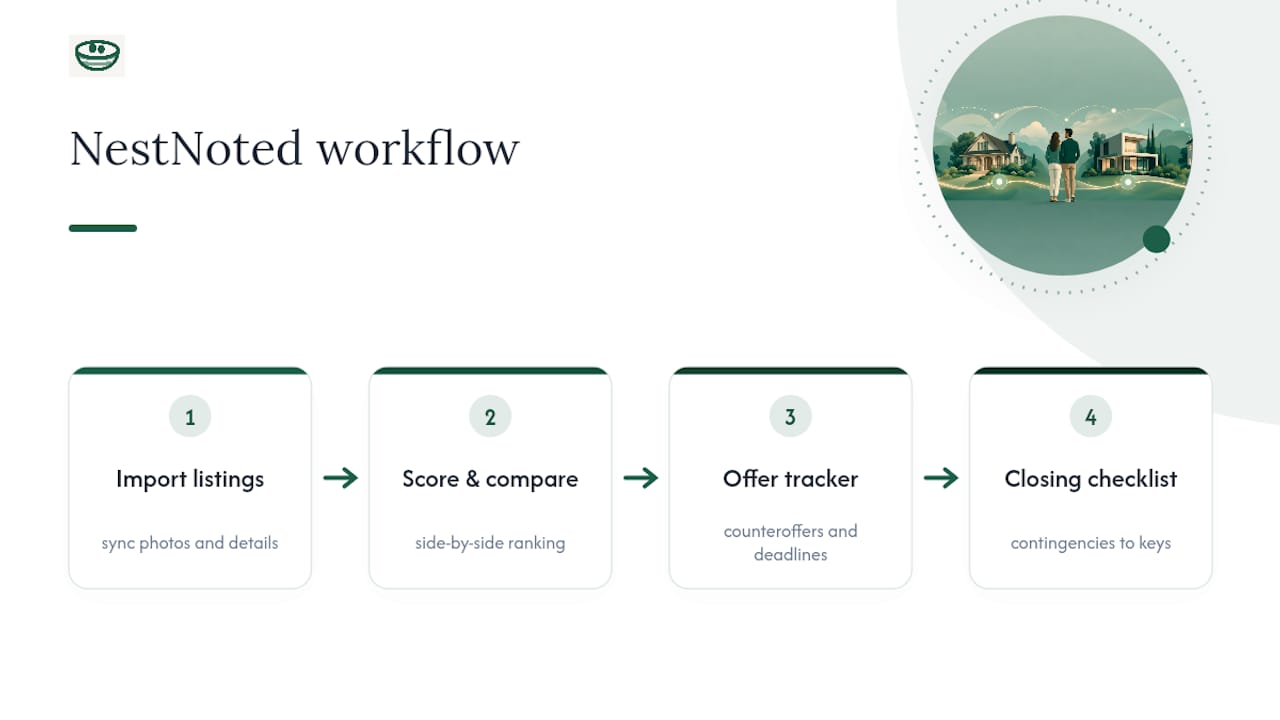
Such a platform may import listings from major sites like Zillow and Redfin, syncing photos and details so you're not retyping addresses after a long tour day. Scoring and side-by-side comparison views can help with ranking, while an offer tracker holds counteroffers and deadlines in chronological order. A closing checklist helps keep contingency dates visible during the stretch between accepted offer and keys in hand.
Author Perspective: The Habits That Actually Make This Work
The tool matters less than the discipline around it. Score every house within the hour, not that night. Cap tours at three or four, always. Treat your offer log like a legal document, dated, current, never reconstructed from memory under deadline pressure. A great system with sloppy habits still produces the same blurred, unreliable notes as no system at all.
— Antony
Try Nestnoted's Private Workspace for Your Next Home Search
A private dashboard where notes, photos, scores, and offer history live in one place instead of a dozen can provide these features and map directly to the checklist above, including private-by-default notes, listing imports from Zillow and Redfin, custom scoring and comparison views, and an offer tracking feature that helps keep negotiation history straight when deadlines are tight.

There's no cost to start. Create your free workspace at Nestnoted and import your current active listings before your next tour, so the next house you see already has somewhere real to land.
Sources
Before your next showing, run each address through a few free public tools:
FAQ
What Should I Track During a Home Tour?
Track photos in a consistent room-by-room order, a same-day impression note, and any red flags worth flagging for inspection. A property viewing checklist helps standardize this across every showing so nothing gets skipped under time pressure.
When Should I Switch From a Listing App to a Private Tracker?
Switch the moment you schedule a second tour or consider making an offer. Discovery apps like Zillow are built for browsing, not for holding negotiation history, inspection notes, or offer deadlines once a property becomes a serious contender.
How Do I Keep MLS Numbers Private When Sharing With My Agent?
Store MLS numbers and seller contact details in private fields rather than shared notes or screenshots, and use selective sharing permissions when sending information to an agent or co-buyer. A dedicated private home buying workflow keeps these identifiers out of public or forwardable text.
Does Nestnoted Cost Anything to Use?
Nestnoted's main features, private notes, listing imports, scoring, and offer tracking, are currently free to use. Pricing details for any future premium features are available directly on Nestnoted.
How Many Homes Should I Tour Before My Notes Start Blurring Together?
Most buyers start losing clarity after three or four homes in a single outing. Capping tours at that number and scoring each property within the hour keeps your notes comparable instead of reconstructed from memory days later.