

Check four things first: who can open a sharing invite and when it expires, whether your notes default to private or visible, whether the app keeps an immutable audit log of every view, and whether you control export and deletion of your own records. Tools built around privacy-by-design, including NestNoted, keep notes private by default rather than public, unless you say otherwise. The rest of this guide walks through configuring and verifying each of those four controls.
TL;DR:
- Keeping note and listing privacy defaults set to private prevents unintended public exposure and minimizes risks during team collaboration.
- Regularly verifying permission roles, share link expirations, and audit logs helps detect and prevent accidental or malicious data leaks.
- Vendors should be audited for compliance standards like SOC 2 or ISO 27001, with clear breach notification timelines and confirmed data deletion procedures.
- Using encrypted portals for document sharing, enabling multi-factor authentication, and avoiding unencrypted email protects sensitive borrower and buyer data.
- Ensuring cross-device sync, role isolation, and periodic permission reviews prevent unintended access and privacy drift across accounts and platforms.
Table of Contents
- How Home Search Privacy Settings Actually Work
- How Do You Configure and Verify Privacy Settings?
- Governance Agents and Teams Should Demand From Any Vendor
- Security Practices That Actually Reduce Risk
- Managing Settings Across Mobile and Desktop
- Fixing Common Privacy Setting Problems
- Keeping Privacy Settings Consistent Across Accounts and Devices
- Antony's Field Notes: The Mistakes I See Most Often
- Get Private-By-Default Tracking Set Up in Minutes
- Where to Verify Vendor Privacy Claims
- Sources
- FAQ
How Home Search Privacy Settings Actually Work
Every privacy setting inside a property-management tool controls a specific piece of exposure. Get the mapping wrong, and you either lock out your own agent or leave sensitive notes visible to people who never should have seen them.
Saved listing visibility usually comes in three flavors: private (only you), team-only (you and invited collaborators), and share-link (anyone with the link, often time-limited). Private inventory and coming-soon listings deserve the tightest setting, since buyers routinely miss off-market opportunities when agents don't manage sharing deliberately.
Private notes and impressions are where candor lives, and candor dies the moment a note might go public. A tool worth using treats notes as private by default and lets you redact or share individual entries, not the whole file. Offer records deserve even stricter handling than notes: numbers, contingencies, and financing terms should require explicit access grants, not blanket team visibility.
Role-based permissions matter more than most buyers realize. A teammate helping you compare kitchens doesn't need the same access as the agent structuring your offer, and an admin account managing exports needs tighter oversight than either.
Here's what a sound privacy setup covers:
- Listing visibility: private, team-only, or share-link, chosen deliberately per property
- Note-level controls: default privacy plus per-note sharing overrides
- Offer protections: restricted access separate from general note visibility
- Role mapping: agent, teammate, and admin permissions scoped to actual job needs
- Audit logs: immutable records of who viewed or exported what, and when
- Retention rules: automated deletion or archival windows instead of indefinite storage
Each layer reduces what a breach, a mistaken invite, or a departing teammate can expose.
How Do You Configure and Verify Privacy Settings?
Configuring privacy settings well takes a short amount of time. Verifying them takes five more, and most people skip that part, which is exactly how leaks happen.
- Lock down the account first. Turn on two-factor authentication, use a password manager instead of a reused password, and confirm your device has a passcode or biometric lock.
- Set your default note visibility to private. Do this before you log a single listing, so nothing sits exposed while you figure out the settings later.
- Configure listing-level visibility as you save each property. Choose private, team-only, or a share link, and set an expiration date on any link you generate.
- Restrict download and export rights. Limit who can pull data out of the system, not just who can view it.
- Assign minimal privileges by role. Give teammates access to what they need for the task at hand, and reserve admin rights, especially bulk export and deletion, for a narrow group.
- Set retention rules. Decide how long closed or abandoned searches stay in the system before automatic archival or deletion.
- Run a verification pass. Create a test record, simulate a teammate or agent role to confirm what they can actually see, and check the audit log to confirm the access event was captured.
Pro Tip: Before you ever share a real offer or financial document, create an inert test record, invite a collaborator, and watch what they can open. Run this same check quarterly. Permissions drift as teams change, and a five-minute audit catches problems before they become breaches.
Governance Agents and Teams Should Demand From Any Vendor
Individual settings only work if the surrounding policy holds up. Brokerages and teams need governance that goes beyond one buyer's account.
Start by mapping every function, showing listings, logging offers, exporting data, to the minimum permission that function requires, and write it down so role assignments aren't improvised. When vetting any vendor handling client data, ask about:
- SOC 2 or ISO 27001 certification status, and how recently it was audited
- Named subprocessors and what data each one touches
- Breach notification timelines written into the contract, not just promised verbally
- Data processing agreement clauses covering deletion and data return
Operationally, capture consent with a timestamped, auditable ledger rather than a checkbox nobody can trace back later, since regulators increasingly expect that kind of record. Revoke access immediately when someone leaves the team, not at the next scheduled review. Contracts should require deletion certification, a signed attestation or receipt proving data left every active system and subprocessor, and that obligation should flow down to any vendor the primary vendor uses. Review vendor relationships and permission structures quarterly, or immediately after any staffing change.
Security Practices That Actually Reduce Risk
Good settings mean little if the underlying habits are careless. A few practices do most of the work.
Exchange documents through encrypted, HTTPS-secured portals, never unencrypted email. Compliance guidance for lender data is explicit on this point: tax returns, W-2s, and bank statements sent as email attachments are a known failure mode, not a gray area. NestNoted's approach to keeping records inside a private workspace instead of scattered email threads reflects this same logic.
Email is still one of the most common vulnerability vectors in real estate transactions, and the same borrower-data compliance research that flags unencrypted attachments also recommends encrypted portals as the baseline expectation for 2026.
A short list of habits closes most of the remaining gap:
- Enable multi-factor authentication on every account tied to property data
- Keep your OS and apps updated rather than postponing patches
- Use a password manager instead of memorized or reused passwords
- Avoid public Wi-Fi when opening offer documents or financial statements
- Know how to request deletion, correction, or export of your own data, and expect a vendor to respond promptly
Underneath all of this sits a design principle, not just a checklist. Privacy-by-design means the system collects only what it needs, makes the private option the default, and reduces what a hacked account or a misdirected invite can expose in the first place.
Managing Settings Across Mobile and Desktop
Privacy controls don't always look the same across platforms, and that mismatch is where a lot of accidental exposure happens.
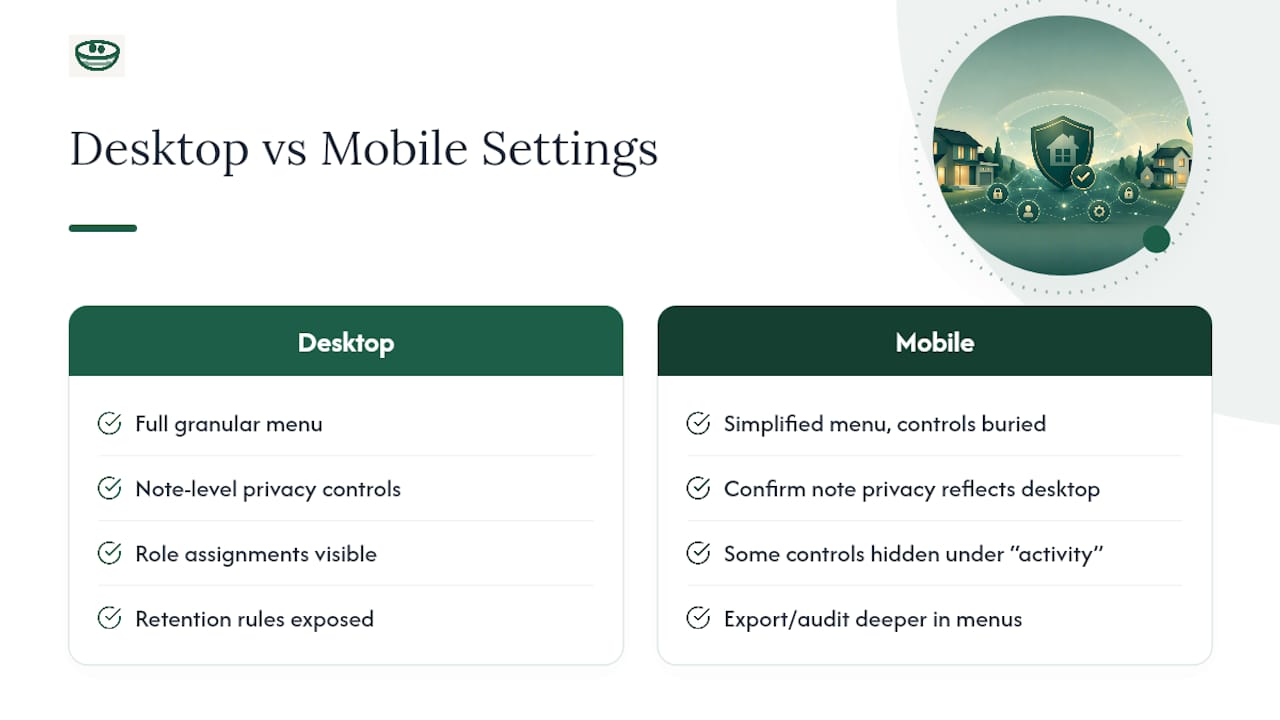
Desktop apps typically expose the full settings menu: granular note-level sharing, role assignments, retention rules, and audit log review in apps commonly used like Zillow, Trulia, and Redfin. Mobile apps often simplify this for screen space, burying export controls a few taps deeper or hiding audit logs behind a settings submenu labeled something vague like "activity." If you set a note to private on desktop, confirm the mobile app reflects that same status before you rely on it in the field.
Push notifications are worth a specific check. Some apps preview note content on a lock screen, which defeats the purpose of a private note if your phone is sitting on a kitchen counter during a showing. Turn off content previews for the app, or at minimum for anything tagged as an offer or financial note.
Biometric app locks, separate from your phone's general lock screen, add a layer worth enabling on mobile specifically, since a property-management app often stays logged in for convenience during a busy touring day. Desktop sessions tend to time out faster by default, but confirm that setting rather than assuming it.
If you switch between a shared family tablet and a personal phone, check both independently. A setting confirmed on one device has no bearing on the other unless the app explicitly syncs it, which brings up the next issue entirely.
Fixing Common Privacy Setting Problems
A handful of privacy-setting complaints show up again and again, and most trace back to a small number of causes.
A share link doesn't expire when expected. Some apps generate links with a default long expiration unless you manually shorten it. Check the link's settings at creation time, not after the fact, and regenerate any link you're unsure about rather than trusting an old one still floating in a text thread.
A teammate can see more than they should. This is almost always a role-assignment error, not a bug. Pull up that person's role, compare it against what they actually need, and downgrade it. Then check the audit log to see what they've already accessed.
Notes marked private still appear to a collaborator. Confirm the note-level override wasn't set separately from your account default. Per-note sharing settings usually take precedence over the global default, which is useful until you forget you set one.
Deletion doesn't seem to remove data everywhere. Ask whether the vendor's deletion process covers subprocessors and backups, not just the primary database. A legitimate vendor should be able to confirm deletion in writing.
Audit logs show gaps or missing entries. This is worth escalating directly to support rather than assuming it's cosmetic. An immutable audit trail is a core trust mechanism, and gaps undermine the entire point of having one.
Keeping Privacy Settings Consistent Across Accounts and Devices
Settings that don't sync across your accounts create the illusion of privacy without the substance. This trips up couples buying together and agents running multiple client workspaces more than anyone else.
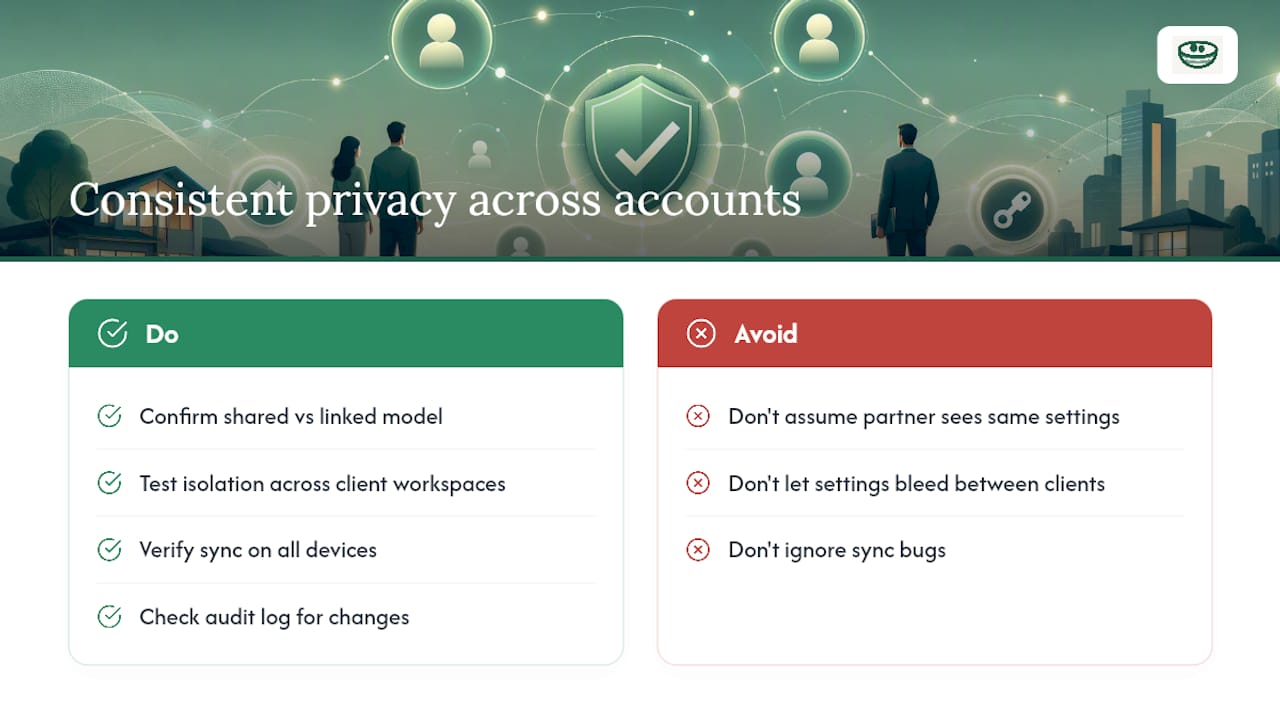
If you and a partner both track the same properties, confirm whether the app treats you as one shared workspace or two linked accounts. The distinction matters: a shared workspace usually means one set of privacy defaults for both of you, while linked accounts might let one partner set notes to private that the other still can't see, by design. Know which model you're using before you assume your partner sees what you see.
Agents managing several client relationships face a sharper version of the same problem. Each client workspace should have its own isolated permissions, and a change made in one client's project should never bleed into another's. Test this directly: open two separate client workspaces and confirm that a role assigned in one doesn't quietly carry over.
Cross-device sync is where subtle failures hide. Turning on a private note default in your desktop account should apply the moment you open the mobile app with the same login. If it doesn't, that's a sync bug worth reporting rather than working around. Log out and back in on each device after making a major privacy change, and check the audit log afterward to confirm the setting actually applied where you expect it.
Antony's Field Notes: The Mistakes I See Most Often
Four mistakes account for most of the privacy failures I've come across: notes left public by default, share links with no expiration date, offer documents emailed instead of routed through a secure portal, and role separation so loose that every teammate ends up with admin-level access.
None of these require sophisticated fixes. Run a test record before sharing anything real. Audit permissions every quarter, not annually. Ask vendors directly about their subprocessors and breach timelines before signing on. And when someone leaves a team, demand proof of deletion, not just a verbal assurance that access was revoked.
— Antony
Get Private-By-Default Tracking Set Up in Minutes
This tool is built around the exact controls this guide walks through: notes stay private by default, roles determine who sees what, listings import directly from major real estate sources, and every access event lands in an audit trail rather than disappearing. Document handling stays inside the platform instead of scattered across email threads, which sidesteps the unencrypted-attachment problem outright.

Getting started takes four steps: create an account, confirm your note and listing visibility defaults are set to private, invite your agent or partner with a scoped role, and run a quick test record before you log anything real. That last step takes two minutes and catches most sharing mistakes before they matter. Start tracking your home search privately and see the layout for yourself.
Where to Verify Vendor Privacy Claims
Vendor claims about privacy are only as good as the standards behind them. The privacy-by-design principles from OneTrust outline the data-minimization framework worth measuring any tool against. For the compliance side, review how state privacy laws like CPRA apply to real estate platforms, and for document handling specifically, check current guidance on securing borrower and buyer data before you send anything sensitive over email.
Sources
- Principles of privacy by design — OneTrust
- Legals
- Protecting borrower data in 2026 — Asurity
- Real estate data security & compliance (CPRA, RESPA, Fair Housing) — NewAgeSysIT
FAQ
What Are the Most Important Home Search Privacy Settings to Check?
Check sharing invite expiration, note visibility defaults, audit log activity, and your export or deletion rights first. Those four controls cover most of the exposure a buyer or agent realistically faces.
Are My Notes Private by Default in NestNoted?
Yes. NestNoted keeps notes and impressions private by default, so nothing becomes visible to another person unless you actively invite them or share a specific record.
How Do I Delete or Export My Saved Searches and Notes?
Look for a data or account settings menu with export and deletion options; a compliant vendor should also honor a direct written request for access, correction, or deletion within a reasonable timeframe.
Why Shouldn't I Email Offer Documents or Financial Statements?
Unencrypted email is a known vulnerability for sensitive documents like tax returns and bank statements; secure document portals protect that same information in transit and at rest instead.
What Should an Audit Log Actually Show Me?
A proper audit log records who viewed, edited, or exported a record and when, and that record should be immutable so it can't be altered after the fact.